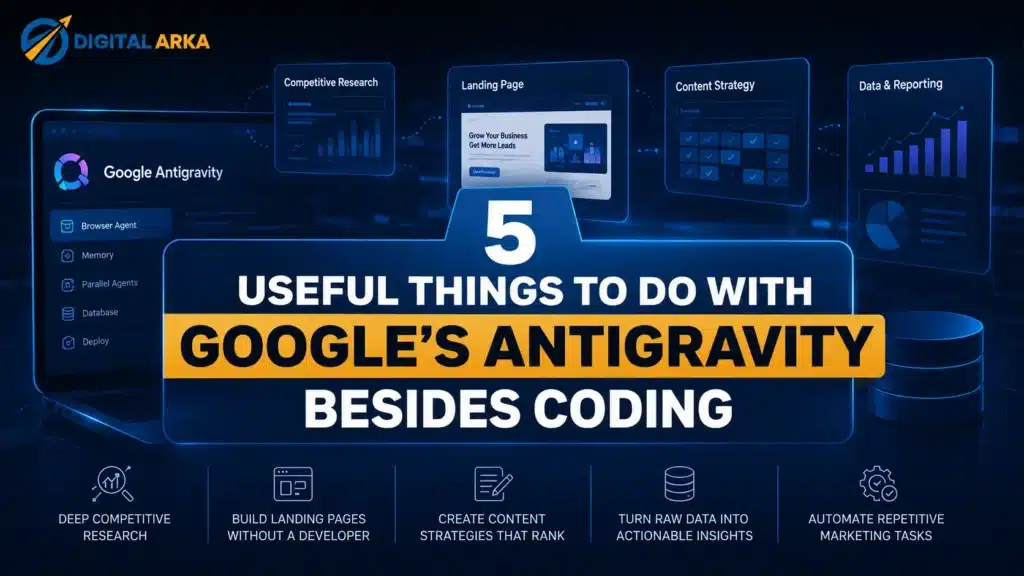

When Google launched Antigravity in late 2025 and then upgraded it to Antigravity 2.0 at I/O 2026, most coverage treated it as a developer story. Koray Kavukcuoglu, Google DeepMind’s CTO, put it plainly at a press briefing ahead of I/O: “We are expanding Antigravity beyond a coding environment and turning it into a platform to develop and manage teams of autonomous AI agents.” The demo everyone talked about was Varun Mohan building a working operating system core live on stage — and then running Doom on top of it.
Fair enough. That is a good demo. But the developer framing buried something more interesting: Antigravity’s core capabilities — a browser that sees and navigates pages the way a human does, a persistent memory system that learns across sessions, true parallel agent execution, and native database access — serve tasks that have nothing to do with writing functions.
At Digital Arka, we work with businesses in Delhi NCR who are not writing code but are absolutely drowning in research, content, reporting, and competitive analysis. This post covers five things you can do with Google Antigravity right now that will save your team hours every week, none of which involve a single line of syntax.
💡 Digital Arka note: Antigravity 2.0 is free for individuals in public preview as of July 2026. Download the desktop app at labs.google/antigravity or antigravity.google. You need a personal Gmail account — Google Workspace accounts are not yet supported during preview.
01 Run Deep Competitive Research Without Lifting a Finger
Competitive research sounds simple and takes hours. You open five competitor websites, check their service pages, scroll their blog archives, note their pricing hints, look at their GBP listings, check what keywords they rank for in Google Search Console — and by the time you have a coherent picture you have burned most of a morning.
Antigravity changes this because its browser integration goes deeper than most AI tools. Google built Antigravity around Chrome, which means the agent does not parse raw HTML. It sees and navigates pages the way a human does: scrolling, clicking, reading rendered content. You can give it a task like: “Research the top five SEO agencies in Delhi. For each one, extract their service list, pricing signals, blog publishing frequency, and any case studies they mention. Structure the output by agency, with a summary comparison at the end.”
The agent runs this across all five sites simultaneously — parallel sub-agents, each in their own lane — and returns a structured report you can actually reference. According to KDnuggets’ April 2026 breakdown of non-coding Antigravity uses, this kind of market research task “would normally require writing a research brief and then waiting for someone else to execute it.” With Antigravity, you write the brief once as a prompt and walk away.
How Digital Arka uses this
Our team runs Antigravity competitor sweeps before every client proposal. We assign the agent a seed list of five to eight competing businesses, ask it to pull service pages, Google Reviews summaries, GBP completeness scores, and any visible pricing. The output lands in thirty minutes as a structured document we drop straight into the pitch deck. Previously that was a half-day task.
⚡ Try this prompt: “Visit [competitor 1], [competitor 2], [competitor 3]. Extract: services offered, pricing or pricing signals, number of Google reviews and average rating, date of most recent blog post, and any visible client logos or case studies. Present findings in a comparison table.”
02 Build Campaign Landing Pages Without a Developer
Marketing teams spend an embarrassing amount of time waiting on developers for landing pages. A campaign brief is ready. The audience segment is defined. The offer exists. And then everyone sits in a queue because the development sprint is full.
Antigravity closes that gap because it can take a brief — target audience, offer, desired layout, brand colours — and produce a functional, deployable landing page. Not a mockup. Not a wireframe. A working HTML/CSS page you can push live through Google Cloud Run or Firebase Hosting, both of which have native Antigravity integrations. The agent writes the code, opens a live browser preview, identifies any visual alignment issues, fixes them, and presents a final deliverable with a screenshot.
Antigravity also ships with Nano Banana Pro, Google’s AI image generation tool, embedded directly inside the platform. The same agent that builds your landing page layout generates the hero image that fits it. Design review and implementation happen in a single workflow — no Figma handoff, no asset export, no back-and-forth.
DesignRush’s December 2025 coverage of the platform quoted Bojan Bajic, VP of Marketing at Infinum: “Agentic platforms like Antigravity will fundamentally shift what’s possible for marketing operations. We’re seeing a clear divide emerge between organisations that can rapidly prototype technical solutions in-house and those still dependent on lengthy development cycles.”
What this means for Indian SMBs
Most small businesses in Delhi NCR cannot afford to keep a developer on retainer for quick campaign pages. A festival offer page for Diwali, a lead capture page for a new service, a landing page for a Google Ads campaign — these take days to get made and cost money they often do not have. Antigravity makes these self-service. You describe what you need in plain language and the platform produces it.
⚡ Try this prompt: “Build a lead generation landing page for a Delhi-based SEO agency offering a free website audit. Include: a headline, three benefit points, a contact form with name, email, phone, and business name fields, and a CTA button that says ‘Claim Your Free Audit’. Use a white and blue colour scheme. Show me a preview.”
03 Audit and Restructure Your Content in Bulk
A content audit — reviewing every page on your site for thin content, missing meta descriptions, broken internal links, duplicate topics, and outdated statistics — is one of those jobs everyone knows they should do and nobody wants to do manually. On a 50-page site it takes days. On a 200-page site it takes weeks.
Antigravity’s browser agent can crawl your site, extract page titles, meta descriptions, word counts, heading structures, and last-modified dates from each page, and cross-reference them against a set of criteria you define. Run a content audit at the same time as a competitor research sweep and a database query — each in its own agent lane — and all three finish while you are in a meeting. The parallel execution is not a marketing claim. It is the literal architecture. Multiple sub-agents work simultaneously on independent tasks in isolated environments.
The platform also persists findings to a shared knowledge base across sessions. The audit results from today become part of Antigravity’s memory for future tasks. Ask it next month to check whether you fixed the issues it flagged and it already knows which pages were problematic.
The SEO angle
For Digital Arka clients, we use content audit runs to identify three specific problems that consistently hold Indian business sites back in Google AI Overviews: pages with no clear H2 question structure, pages where the opening paragraph buries the key answer under three lines of context, and service pages with duplicate FAQ content copy-pasted across multiple pages. Antigravity flags all three in minutes. Fixing them is still a human job — but finding them used to take a full audit cycle.
⚡ Try this prompt: “Crawl the following URLs [paste list]. For each page, extract: page title, meta description (present or missing), H1 text, word count estimate, whether a FAQ section exists, and date of last visible publication. Flag any pages where the title and H1 say the same thing, or where the meta description is missing.”
04 Query Your Business Data in Plain English
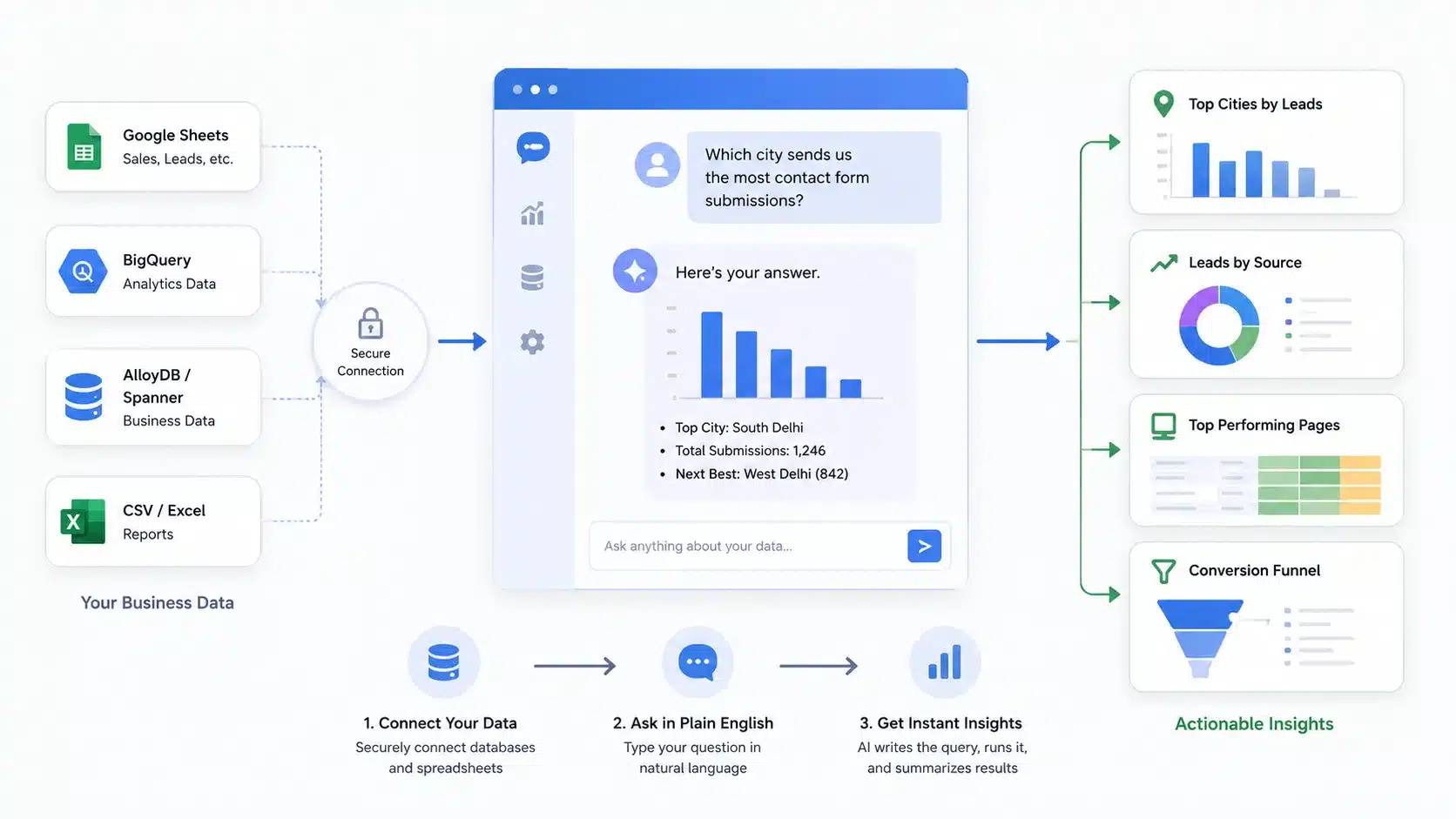
Most businesses sit on data they cannot access without a developer or a BI analyst. Your sales records live in a Google Sheet. Your lead pipeline is in a database nobody on the marketing team can query. Your ad performance data is in a spreadsheet that needs custom formulas to slice correctly.
Antigravity ships with native Model Context Protocol (MCP) server support, which means it connects directly to databases including BigQuery, AlloyDB, and Spanner through a UI-driven setup — no API key management, no SQL knowledge required. Once connected, you ask it questions in plain English and it writes and executes the query, interprets the result, and summarises the finding.
“Which of our blog posts generated the most leads in the last 90 days?” “Which service page has the highest bounce rate in June?” “Which city sends us the most contact form submissions?” These are questions that typically require a data analyst or a BI dashboard someone set up a year ago. Antigravity answers them in the same interface where you run your research and build your pages.
BrightCoding’s May 2026 guide to Antigravity 2.0 describes this capability directly: “You are no longer the one typing console.log or debugging CSS alignment. You are the product manager, and a swarm of Gemini 3.5-powered sub-agents is your engineering team.” For non-technical business owners, that is not a developer productivity story — it is a data access story.
Practical example for a Delhi business
A client of ours runs a mid-size coaching institute in West Delhi. Their student enquiry data sits in a BigQuery table that their IT vendor set up in 2023. Nobody on their marketing team could access it without calling the vendor. We connected Antigravity to their BigQuery instance in fifteen minutes, then asked it: “Which courses generate the most enquiries from South Delhi pin codes in the April-June quarter?” The answer came back in forty seconds with a bar chart. That answer shaped their Q3 ad targeting directly.
⚡ Try this prompt (after connecting your database via MCP): “Query [table name]. Show me the top 10 sources of leads by city for the last 60 days. Group results by city and source. Summarise which city and source combination we should focus our next campaign on.”
05 Automate Recurring Reports and Business Monitoring
Reporting is a weekly tax on every marketing team. Someone pulls numbers from Google Analytics, formats them into a slide, writes a summary paragraph, and sends it to management. Every week. Same slides, slightly different numbers, same formatting time.
Antigravity 2.0 introduces scheduled tasks and persistent background operations — features that Google explicitly calls out as what separates it from an IDE. You set a recurring task: every Monday at 09:00, pull last week’s GSC data for the top 20 queries, compare it to the previous week, flag any query where impressions dropped more than 15%, and email the summary to the team. The agent runs it. You get the email. Nobody touched a dashboard.
The same logic applies to brand monitoring. Ask an agent to check four times a day whether any new article mentioning your business name appears in Google News or on specific industry forums. When it finds something, it sends an alert with a link and a one-line summary. This is the early version of what Google calls Information Agents — announced at I/O 2026 and rolling out through the rest of the year — but you can build a working version of the core behaviour inside Antigravity today.
Digital-loop.com’s May 2026 Antigravity 2.0 analysis describes the broader shift: “Those who learn today to use Antigravity 2.0 as a ‘digital conductor’ for web assets, landing pages, and campaign code will scale their output speed many times over.”
Why this matters for agencies and consultants
Digital Arka runs monthly SEO performance reports for twenty-plus clients. Before Antigravity, that was a two-day job for one person. We now use scheduled agents to pull each client’s GSC and GA4 data, draft the narrative summary using the month-on-month delta, flag which pages gained or lost the most clicks, and drop the draft into Google Docs for a human review before it goes out. The human review still takes an hour per client. The data pulling and draft writing no longer takes any time at all.
⚡ Try this prompt: “Every Monday morning, check Google Search Console for [domain]. Pull the top 20 queries by impressions from the previous 7 days. Compare to the 7 days before that. Flag any query where clicks dropped by more than 20%. Format the output as a short executive summary with a table appended.”
What You Actually Need to Get Started
Before you set up Antigravity for any of the five use cases above, a few things worth knowing:
- Antigravity 2.0 is free for individuals in public preview as of July 2026. Download the desktop app for macOS (Monterey 12+), Windows 10+ (64-bit), or Linux.
- You need a personal Gmail account for authentication. Google Workspace accounts are not yet supported during the preview period.
- The primary model is Gemini 3.5 Flash, but you can switch individual agents to Claude Sonnet 4.6, Claude Opus 4.6, or GPT-OSS 120B for specific tasks where you prefer a different model.
- Chrome must be installed for browser integration features — this is what enables the human-style page navigation that makes research and page-building work well.
- For regulated industries or client data containing PII, treat Antigravity as a public cloud environment until a formal data processing agreement covers the tool. Do not paste sensitive personal data into agent prompts.
📞 If you want Digital Arka to set up an Antigravity workflow for your business — competitor research, landing page automation, content auditing, or weekly reporting — contact us at digitalarka.com or call +91 70110 34858. We help Delhi NCR businesses run these agent workflows without needing an in-house developer.
Frequently Asked Questions
Q1. Do I need to know how to code to use Google Antigravity for these tasks?
A: No. Every use case in this post runs on natural language prompts. You describe what you want the agent to do in plain English — or Hindi — and Antigravity handles the execution. The platform generates code internally to complete tasks, but you never see or interact with it unless you choose to. Marketing managers, content teams, business analysts, and agency account managers can use all five workflows described above without any coding knowledge.
Q2. Is Google Antigravity free in India?
A: Yes. Antigravity is free for individuals during the current public preview, including users in India. Download the desktop app at labs.google/antigravity or antigravity.google. You need a personal Gmail account — Indian Gmail accounts work. Google Workspace (G Suite) accounts are not yet supported. A paid subscription tier is expected when the product exits preview, likely structured as Individual Free, Pro at approximately $20/month, and Enterprise at $40-60/user/month.
Q3. What is the difference between Google Antigravity 1.0 and 2.0?
A: Antigravity 1.0, launched in November 2025, was a VS Code-based AI coding environment where a single agent helped you write and debug code interactively. Antigravity 2.0, announced at Google I/O May 2026, is a standalone desktop application built around parallel multi-agent orchestration. Instead of one agent helping you code, multiple sub-agents work simultaneously on independent tasks in isolated environments. Scheduled tasks, persistent background operations, and expanded non-coding use cases are all 2.0 features.
Q4. How is Google Antigravity different from Cursor, GitHub Copilot, or Claude Code?
A: Cursor and GitHub Copilot assist developers while they write code — AI suggestions inside the editor, inline completions, chat sidebars. Claude Code operates similarly via a command-line interface. Google Antigravity takes a fundamentally different approach: the agent replaces the coding loop entirely, planning and executing multi-step tasks autonomously while you supervise at the objective level. Antigravity also integrates a Chrome-powered browser agent and MCP database connections, which the others do not, enabling the non-coding workflows described in this post.
Q5. Can Google Antigravity agents browse the web and research content?
A: Yes. Antigravity’s browser integration is built on Chrome, which means agents navigate web pages the way a human does — scrolling, clicking, reading rendered content — rather than parsing raw HTML. This enables accurate competitive research, content auditing, and fact-checking across live websites. You can instruct an agent to visit multiple competitor pages simultaneously, extract structured information from each one, and return a comparison report.
Q6. What databases does Google Antigravity connect to?
A: Antigravity ships with native MCP (Model Context Protocol) server support and connects to Google Cloud databases including BigQuery, AlloyDB, and Spanner through a UI-driven setup that does not require writing connection strings or managing API keys manually. It also supports custom MCP server configurations, which means you can connect it to other database systems your business already uses. Once connected, you query data in plain English and the agent writes and executes the underlying query.
Q7. How do scheduled tasks work in Antigravity 2.0?
A: Antigravity 2.0 introduces scheduled tasks and persistent background operations — you define a task, set a recurrence schedule (daily, weekly, on a specific time), and the agent runs it automatically without any manual trigger. The agent can pull data, format a report, send an email, or monitor a website for changes on the schedule you set. This enables automated weekly reporting, recurring competitor monitoring, and brand mention alerts without human intervention on each cycle.
Q8. Can Google Antigravity build landing pages without a designer or developer?
A: Yes. You describe the landing page you need — purpose, audience, offer, layout preferences, colour scheme — and the agent writes the HTML/CSS, opens a live browser preview, identifies any visual issues, and fixes them. Antigravity also integrates with Nano Banana Pro, Google’s AI image generator, so the agent can create the hero image and other visual assets inside the same workflow. Completed pages deploy directly to Google Cloud Run or Firebase Hosting through native integrations.
Q9. Is it safe to use Google Antigravity with client or business data?
A: For general business tasks — public website research, marketing content, non-sensitive analysis — Antigravity is safe to use. For tasks involving personally identifiable information (PII), regulated health or financial data, or confidential client information, Google advises treating Antigravity as a public cloud environment until a formal Business Associate Agreement or Data Processing Agreement covers the tool. Do not paste sensitive personal data into agent prompts during the preview period. This is standard guidance for any cloud AI tool, not specific to Antigravity.
Q10. How does Antigravity’s persistent memory work across sessions?
A: Antigravity saves useful context, agent outputs, and reference material to a shared knowledge base that persists across sessions. When you run a competitor research task today, the findings become part of the system’s memory for future tasks. Ask it next month to check whether specific issues you identified have changed and it already knows the baseline from the previous session. This is fundamentally different from chatbot AI tools where every conversation starts from zero. For recurring workflows like monthly reporting or ongoing competitor tracking, this persistent memory makes the system progressively more useful over time.
Q11. What are the limitations of Google Antigravity for non-coders?
A: Real limitations exist and are worth knowing. First, very custom or legacy systems with unusual architectures may still confuse the agent — Antigravity works best on standard web technologies and mainstream database systems. Second, Gemini 3.5 Pro Eye has usage limits during the free preview; heavy users will hit temporary cooldowns and need to switch to Claude 4.5 or a local model. Third, agent outputs still need human review before you publish or act on them — Antigravity reduces effort, it does not remove judgment. Finally, Google Workspace accounts are not yet supported, which creates friction for organisations already running on Workspace.
Q12. Can I use Google Antigravity for SEO tasks specifically?
A: Yes. Antigravity suits several SEO workflows directly: content auditing across multiple URLs, competitive research on competitor service pages and blog archives, structured data review, keyword gap analysis using web research agents, and weekly performance reporting from Google Search Console via MCP connection. Search by Dua’s May 2026 analysis notes that “Antigravity-style workflows actually strengthen E-E-A-T when used correctly — AI handles analysis, pattern recognition, and repetitive processing; the human SEO adds experience, contextual understanding, and ethical judgment.” Digital Arka uses Antigravity agents in our own SEO workflow and helps clients set up similar systems.