

Most websites have more duplicate URLs than their owners realise. A product page reachable through three different filter combinations, a blog post available at both an HTTP and HTTPS address during a migration, a page that exists identically at yoursite.com and www.yoursite.com, none of this is unusual, and none of it is necessarily a problem on its own. The problem starts when search engines cannot tell which of those URLs is the one that actually deserves to rank, and end up splitting ranking signals across several near-identical addresses instead of concentrating them on one. Specifying a canonical URL is how you resolve that ambiguity deliberately, rather than leaving it to chance.
What “Canonical” Actually Means Here
A canonical URL is simply the version of a page you want search engines to treat as the authoritative one when multiple URLs serve the same or substantially similar content. Every method below accomplishes the same underlying goal, consolidating signals like links and ranking relevance onto a single preferred URL, but each does it differently, with different strength, different use cases, and different failure modes.
Method 1: The rel=”canonical” Link Element
This is the method most people mean when they say “add a canonical tag.” A small line placed in the head section of the duplicate page points to the preferred version:
<link rel=”canonical” href=”https://www.example.com/preferred-page/” />
Every duplicate variant of a page carries this tag, each pointing to the same single preferred URL. The preferred page itself should also carry a self-referencing canonical tag, pointing to its own URL, which removes any ambiguity if that page is ever accessed through a tracking parameter or slight URL variation later.
This is a signal, not a directive. Search engines generally respect it, but can override it if other strong evidence, internal linking patterns, sitemap entries, actually points elsewhere.
Method 2: The Canonical HTTP Header
A link element only works for HTML pages, since it lives inside the head section. For non-HTML resources, PDFs, images, or other files without an HTML head to place a tag in, the equivalent signal is sent as an HTTP response header instead:
Link: <https://www.example.com/preferred-file.pdf>; rel=”canonical”
This achieves the identical outcome as the link element, just delivered through the server response rather than embedded in page markup, making it the correct choice whenever the duplicate content in question is not an HTML page.
Method 3: A 301 Redirect
A redirect is a fundamentally different tool from the two methods above, stronger, and appropriate for a different situation. Where rel=”canonical” lets both URLs remain accessible while signalling a preference, a 301 redirect eliminates the duplicate entirely, automatically sending any visitor or crawler straight to the preferred URL. Use a redirect when the duplicate URL genuinely should not exist anymore, a domain migration, a permanent URL structure change, and use rel=”canonical” instead when both versions need to remain independently accessible for a legitimate reason, such as a product page reachable through multiple valid filter or sort parameters.
Method 4: Consistent Sitemap Inclusion
Your XML sitemap should list only the canonical version of each page, never the duplicate variants. This will not override a conflicting signal elsewhere on its own, but it reinforces the correct signal alongside your other methods, and its absence, listing a non-canonical URL in your sitemap while pointing elsewhere with your canonical tag, is a genuinely common, confusing mistake worth checking for directly.
Method 5: Consistent Internal Linking
Every internal link on your site, navigation menus, related content links, breadcrumbs, should point to the canonical URL, not to a duplicate variant. This is easy to overlook, particularly on larger sites where links get added by different contributors over time, but consistent internal linking is itself a meaningful signal reinforcing which version you consider authoritative, and inconsistent internal linking actively works against whatever your rel=”canonical” tags are trying to say.
| Method | Strength | Best For |
|---|---|---|
| rel=”canonical” link element | Strong signal, not a directive | HTML pages with legitimate duplicate variants |
| Canonical HTTP header | Strong signal, not a directive | Non-HTML files (PDFs, images, documents) |
| 301 redirect | Directive, not just a signal | URLs that should no longer exist independently |
| Sitemap inclusion | Reinforcing signal only | Supporting your primary canonical method |
| Consistent internal linking | Reinforcing signal only | Supporting your primary canonical method |
Common Mistakes That Quietly Cancel the Signal Out
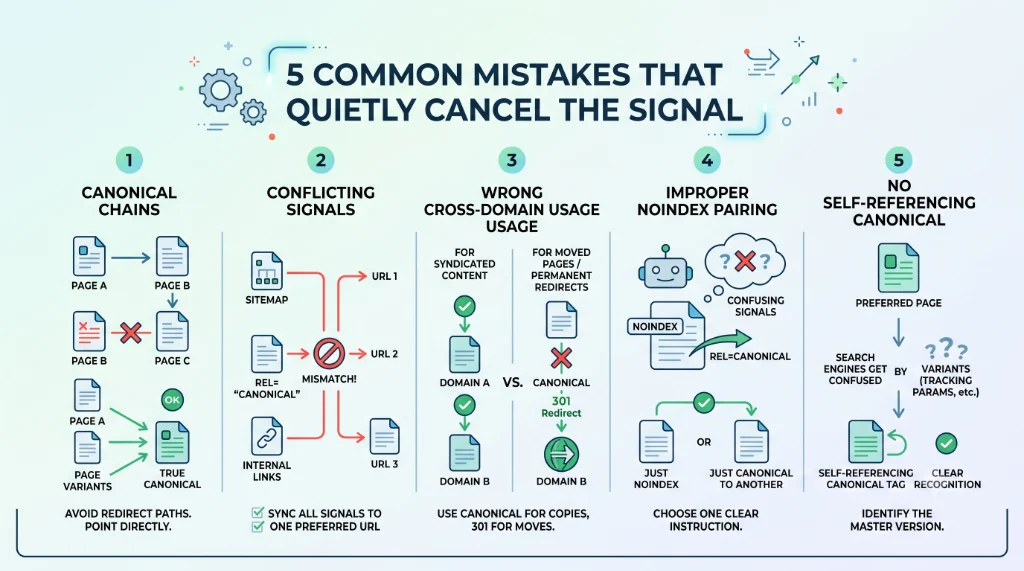
- Canonical chains – Page A pointing to Page B, which itself points to Page C, instead of every duplicate pointing directly to the single true canonical. Point every variant straight to the final destination.
- Conflicting signals across methods – a rel=”canonical” tag pointing to one URL while the sitemap lists a different URL, or internal links point to a third. Pick one preferred URL and make every method agree.
- Cross-domain canonicals used for the wrong reason – this is a legitimate, supported technique for syndicated content, but is sometimes mistakenly applied where a 301 redirect was actually the correct tool.
- Pairing canonical with noindex incorrectly – a page marked noindex while also carrying a canonical tag pointing elsewhere sends a confusing, sometimes self-defeating combination of signals; be deliberate about which single instruction you actually intend.
- No self-referencing canonical on the preferred page itself – leaving the canonical page without a tag pointing to itself creates ambiguity the moment that page is accessed through any URL variation, a tracking parameter, a session ID.
How to Verify Your Canonical Setup Is Actually Working
Checking the HTML source or HTTP headers manually confirms the tag exists, but does not confirm Google agrees with it. The URL Inspection tool in Google Search Console shows both your declared canonical and, separately, the canonical Google actually selected for that URL, and when the two disagree, that gap is exactly where a genuine consolidation problem is hiding.
This article covers the practical mechanics in DigitalArka’s own words; for Google’s own official, authoritative guidance on this topic, including additional edge cases and platform-specific implementation notes, see Google’s documentation on consolidating duplicate URLs, which we gratefully credit as the primary reference for how Google itself recommends handling this.
Conclusion
Consolidating duplicate URLs is rarely about picking the single correct method and using it everywhere. It is about matching the right tool, a canonical tag, an HTTP header, a redirect, to the right situation, and then making sure every supporting signal, your sitemap, your internal links, agrees with that choice rather than quietly contradicting it. Most canonical problems we find during a technical audit are not missing tags, they are signals that disagree with each other, which is usually a faster, cheaper fix than the underlying duplicate content problem itself.