
Unlock the potential of lms.txt and .md formats with our comprehensive guide for developers. Master these essential tools to streamline your processes!
The Importance of llms.txt in Development
In the fast-paced world of software development, efficiency and clarity are paramount. llms.txt, often colloquially referred to as “Large Language Model Specification,” has emerged as a vital tool for developers. This file format serves as a structured way to document and manage the specifications of language models, including their capabilities, limitations, and specific use cases. By having a clear and concise llms.txt file, developers can ensure that everyone on the team is on the same page, which is crucial for maintaining consistency and avoiding miscommunication.
One of the primary advantages of llms.txt is its simplicity. Unlike other documentation formats that can be overly complex and cumbersome, llms.txt is straightforward and easy to read. This simplicity makes it accessible to a wider range of team members, from seasoned developers to project managers and even non-technical stakeholders.
When working in collaborative environments like Claude CoWork, having a clean and structured file like llms.txt becomes even more valuable. It provides a clear and concise overview of a language model’s specifications, helping teams stay aligned and organized. Ultimately, llms.txt helps demystify the technology and makes it more approachable for everyone involved.
Moreover, llms.txt files are instrumental in the iterative development process. As language models evolve and new features are added, the llms.txt file can be updated to reflect these changes. This living document serves as a historical record of the model’s development, allowing team members to track progress and understand the rationale behind specific design decisions. In this way, llms.txt files contribute to a more transparent and collaborative development environment.
Overview of .md Files and Their Uses
Markdown (.md) files have become a staple in the developer’s toolkit, offering a versatile and user-friendly way to create formatted text using a plain text editor. Originally created by John Gruber and Aaron Swartz in 2004, Markdown has grown in popularity due to its simplicity and readability. Developers use .md files for a variety of purposes, including documentation, README files, project wikis, and even writing technical blogs. This flexibility also makes Markdown ideal for structuring content on topics like E-Marketing vs Digital Marketing, allowing writers to present clear, organized, and SEO-friendly information with ease.
One of the key strengths of Markdown is its ability to convert plain text into rich text, complete with headings, lists, links, images, and code blocks. This makes it an ideal format for creating documentation that is both easy to write and easy to read. Unlike HTML, which can be verbose and difficult to edit, Markdown allows developers to focus on the content without getting bogged down in the intricacies of formatting. This ease of use has led to widespread adoption of .md files in the software development community.
Markdown’s versatility extends beyond traditional documentation. For instance, many static site generators, such as Jekyll and Hugo, use Markdown as their primary content format. This allows developers to create sophisticated websites and blogs with minimal effort. Additionally, platforms like GitHub and GitLab have built-in support for Markdown, making it easy to create and manage project documentation directly within the repository. Overall, the simplicity and flexibility of .md files make them an invaluable tool for developers.
Key Differences Between llms.txt and .md
While both llms.txt and .md files serve important roles in the development process, they are fundamentally different in terms of their purpose and structure. llms.txt files are specifically designed to document the specifications and capabilities of language models, presenting key details like model architecture, training data, performance metrics, and usage guidelines in a clear, structured format. This organized approach ensures information is easily accessible and understandable—similar to how topics like Online vs Offline Marketing are best explained with well-structured, side-by-side comparisons for better clarity.
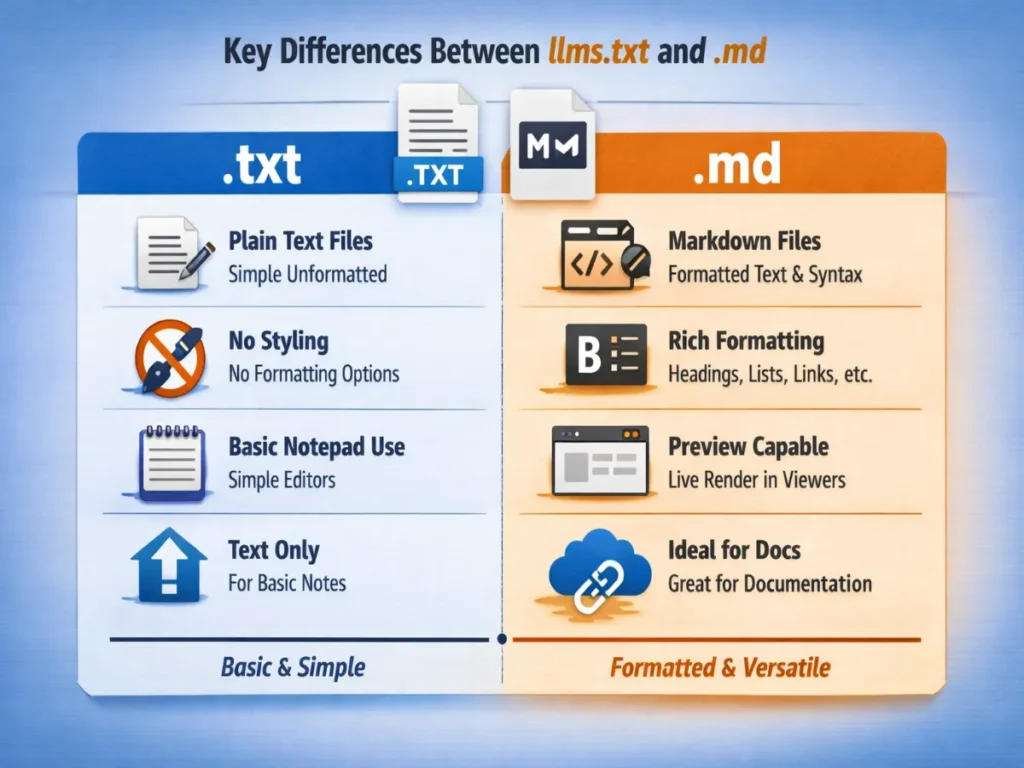
On the other hand, .md files are more general-purpose and flexible. They are designed for creating formatted text documents using a simple markup language. This makes .md files suitable for a wide range of applications, from project documentation to technical blogs and wikis. While llms.txt files are focused on providing detailed specifications, .md files emphasize readability and ease of use. This makes them ideal for creating documents that need to be both informative and engaging.
Another key difference lies in the level of detail and specificity. llms.txt files are typically more detailed and technical, providing in-depth information about the inner workings of a language model, which is essential for developers who need to understand its design and performance nuances. In contrast, .md files can vary in their level of detail depending on the intended audience, ranging from high-level overviews to comprehensive technical documentation. This flexibility makes Markdown a versatile communication tool—similar to how topics like Social Media Marketing vs Digital Marketing can be explained in both simple and detailed formats based on the reader’s needs.
How to Create and Edit llms.txt Files
Creating and editing llms.txt files is a straightforward process, but it requires a clear understanding of the information that needs to be included. The first step is to determine the key specifications of the language model that need to be documented. This typically includes information such as the model’s architecture, training data, performance metrics, and usage guidelines. Once this information has been gathered, it can be organized into a structured format that is easy to read and understand.
One of the most important aspects of creating an llms.txt file is to ensure that the information is presented in a clear and concise manner. This means avoiding overly technical jargon and focusing on the key points that need to be communicated. It is also important to use headings and subheadings to break up the text and make it easier to navigate. This helps to ensure that readers can quickly find the information they are looking for without having to wade through large blocks of text.
Editing llms.txt files is an ongoing process, as the specifications of a language model can evolve over time. It is important to regularly review and update the llms.txt file to ensure it accurately reflects the current state of the model, which may involve adding new information, revising existing content, and removing outdated details. By keeping the file up to date, developers ensure it remains a reliable resource for the entire team—just like how topics such as Digital Marketing vs Online Marketing need continuous updates to stay relevant with changing trends and practices.
Best Practices for Writing .md Documentation
Writing effective .md documentation requires a combination of clear writing, thoughtful organization, and attention to detail. One of the most important best practices is to start with a clear outline of the document’s structure. This can help to ensure that all relevant information is included and presented in a logical order. Using headings and subheadings to organize the content can also make it easier for readers to navigate the document and find the information they need.
Another key best practice is to write in a clear and concise manner, avoiding overly technical jargon and complex sentences. This can help to ensure that the document is accessible to a wide range of readers, including those who may not have a technical background. It is also important to provide clear explanations and examples to help illustrate key points. This can help to make the document more engaging and easier to understand.
In addition to clear writing and organization, it is also important to pay attention to formatting and presentation. This includes using bullet points and numbered lists to break up large blocks of text, as well as incorporating images, diagrams, and code snippets to better illustrate key concepts. Maintaining consistent formatting—such as font sizes, colors, and styles—ensures the document is visually appealing and easy to read. These practices are especially useful when creating content around topics like Digital Marketing, where clarity and structured presentation play a crucial role in engaging the audience.
Common Use Cases for llms.txt and .md Files
llms.txt and .md files are used in a wide range of applications, each serving a specific purpose in the development process. One of the most common use cases for llms.txt files is documenting the specifications of language models, including details such as architecture, training data, performance metrics, and usage guidelines. By providing a clear and concise overview, llms.txt files ensure that everyone on the team stays aligned and informed—especially in rapidly evolving phases like AI Inflection, where understanding model capabilities becomes even more critical.
In contrast, .md files are used for a wide range of documentation purposes. This includes creating README files for projects, writing technical blogs, and maintaining project wikis. .md files are also commonly used for creating user manuals, API documentation, and other types of technical documentation. The versatility and ease of use of .md files make them an ideal choice for a wide range of documentation needs.
Another common use case for .md files is creating static websites and blogs. Many static site generators, such as Jekyll and Hugo, use Markdown as their primary content format, allowing developers to build sophisticated websites with minimal effort. Additionally, platforms like GitHub and GitLab offer built-in Markdown support, making documentation management seamless within repositories. This flexibility also makes Markdown ideal for creating structured and engaging content on topics like Mastering E-Marketing, further highlighting its value as an essential tool for developers.
Tools and Resources for Working with llms.txt and .md
There are a variety of tools and resources available to help developers work with llms.txt and .md files. One of the most popular tools for working with .md files is Visual Studio Code, a powerful and versatile code editor that offers built-in support for Markdown. Visual Studio Code includes features such as syntax highlighting, live preview, and easy integration with version control systems, making it an ideal choice for working with .md files.
Another popular tool for working with .md files is Typora, a minimalist Markdown editor that offers a clean and distraction-free writing environment. Typora includes features such as live preview, syntax highlighting, and seamless integration with cloud storage services, making it a great choice for writing and editing .md files. Additionally, there are a variety of online Markdown editors available, such as Dillinger and StackEdit, which offer a range of features and customization options.
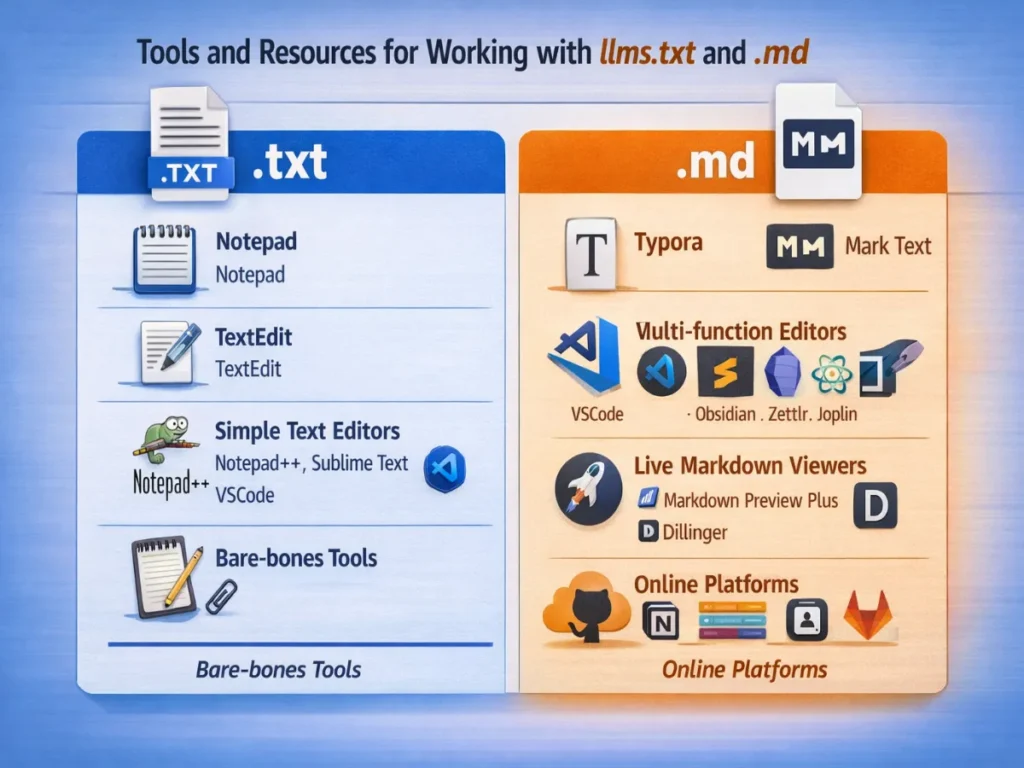
For working with llms.txt files, there are a variety of text editors available, including Notepad++, Sublime Text, and Atom, all of which offer features like syntax highlighting, search and replace, and customizable themes that make editing efficient. In addition to these tools, developers can rely on online tutorials, documentation, and community forums to enhance their understanding and workflow. This structured approach to content creation and management is also helpful when explaining topics like Internet Marketing vs Digital Marketing, where clarity and organization are essential for effective communication.
Troubleshooting Common Issues with llms.txt and .md
Working with llms.txt and .md files can sometimes present challenges, but there are a variety of strategies that can be used to troubleshoot common issues. One of the most common issues with llms.txt files is formatting errors, which can occur when the file is not structured correctly. To troubleshoot formatting errors, it is important to carefully review the file and ensure that all information is presented in a clear and consistent manner. This may involve adding or removing headings, adjusting the spacing, and ensuring that all information is correctly labeled.
Another common issue with llms.txt files is missing or incomplete information. To troubleshoot this issue, it is important to review the file and ensure that all relevant information is included. This may involve consulting with team members, reviewing documentation, and conducting additional research to ensure that all necessary information is included in the file. By ensuring that the llms.txt file is complete and accurate, developers can help to ensure that it remains a valuable resource for the entire team.
For .md files, one of the most common issues is rendering problems, which can occur when the file is not correctly formatted. To troubleshoot rendering problems, it is important to carefully review the file and ensure that all Markdown syntax is correctly applied. This may involve checking for missing or incorrect tags, ensuring that all links and images are correctly formatted, and verifying that all code blocks are correctly labeled. By ensuring that the .md file is correctly formatted, developers can help to ensure that it is rendered correctly and remains easy to read.
Conclusion: Maximizing Your Development Efficiency with llms.txt and .md
In conclusion, llms.txt and .md files are powerful tools that can help developers streamline their processes and improve their efficiency. llms.txt files provide a structured and detailed way to document the specifications and capabilities of language models, ensuring that everyone on the team is on the same page. .md files, on the other hand, offer a versatile and user-friendly way to create formatted text documents, making them ideal for a wide range of documentation needs.
By understanding the key differences between llms.txt and .md files, and by following best practices for creating and editing these files, developers can ensure that their documentation is clear, concise, and effective. Additionally, by leveraging the available tools and resources, developers can streamline their workflows and improve their productivity. Overall, llms.txt and .md files are invaluable tools for developers, helping to ensure that their projects run smoothly and efficiently.
“Is your Google My Business profile playing hide & seek on Google? Digitalarka helps it come out and rank like a star — go check it out!”
Whether you are documenting the specifications of a language model or creating a README file for your latest project, llms.txt and .md files offer a powerful and flexible solution. By mastering these essential tools, developers can unlock their full potential and take their projects to the next level. So why wait? Start exploring the world of llms.txt and .md files today and see how they can help you streamline your development processes and maximize your efficiency.