

The Question Every SEO Asks — And Google Barely Answers Directly
You implement schema markup on your website. You validate it in Google’s Rich Results Test, see no errors, and wait. The rich snippets do not appear. Or they appear inconsistently. Or they appear for some pages but not others that have identical markup. The most common culprit, in our experience at Digital Arka, is not a syntax error — it is a word count or character length mismatch between what you wrote and what Google actually renders or accepts.
Google does not publish a single, consolidated “schema word count guide.” The limits live scattered across type-specific documentation pages in Google Search Central, Merchant Center Help, and developer changelog entries. We pulled them all together. This post gives you the complete field-by-field reference for every major schema type, plus the practical rules that govern how length affects rich snippet display, AI Mode citation, and indexing confidence.
At Digital Arka, we run schema audits for every client as part of our technical SEO engagements. The most expensive mistake we see — expensive in time lost and rankings missed — is verbose schema text that exceeds Google’s display budgets, or sparse schema text that fails to satisfy the minimum information density Google expects. Both extremes cost you rich results. This guide eliminates both.
“Structured data rewards discipline more than volume. A dozen accurate, validated schema blocks outperform fifty half-implemented markups spread across template fragments.” — DigitalApplied Schema Markup Reference, April 2026
Read Also- How to Measure SEO Success in July 2026
The Core Truth: Google Sets No Single Word Count — But It Does Set Limits
Google’s official structured data documentation does not specify a universal word count for schema markup. What it does specify — and enforce — are character limits for individual properties within specific schema types, display pixel budgets that determine how much text appears in rich results, and quality guidelines that penalise either inflated or misleading descriptions.
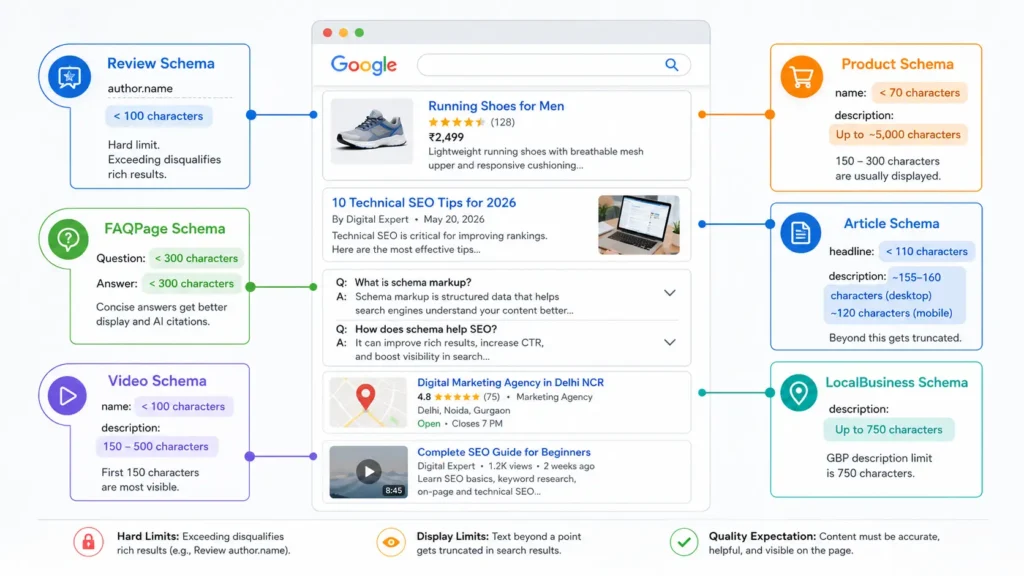
Three distinct constraints govern schema text length across Google’s systems:
- Hard character limits: specific property fields where Google enforces a maximum character count and disqualifies markup that exceeds it (e.g. the review author.name field, limited to under 100 characters).
- Display truncation limits: pixel-width display budgets that cut off text in rich snippets beyond a certain point without disqualifying the markup (e.g. product descriptions in rich results).
- Quality density expectations: Google’s quality guidelines require schema text to be informative, accurate, and visible on the page — ruling out both one-word placeholders and keyword-stuffed paragraphs.
The distinction between a hard limit and a display limit matters enormously. Exceeding a hard limit disqualifies your markup from rich results entirely. Exceeding a display limit simply truncates the visible text — the markup remains valid and eligible. Most SEOs conflate the two, which leads to unnecessary anxiety about some limits and dangerous ignorance of others.
Digital Arka insight: Google has stated explicitly that structured data does not directly influence where you rank. What it does influence is rich result eligibility — and in 2026, AI Mode citation eligibility. Both are worth optimising for.
Read Also: First-Party Data Is the New SEO: Why Indian Businesses Need to Own Their Audience in July 2026
Google Schema Field Limits: The Complete Reference Table
The table below consolidates the character and word count guidelines across every major Google-supported schema type, drawing on Google Search Central documentation, Merchant Center Help, and confirmed developer changelog entries.
| Schema Type + Field | Limit / Guideline | Google’s Enforcement |
| Review — author.name | Under 100 characters (hard) | Disqualifies rich result if exceeded |
| Product — name | 70 characters recommended | Longer names truncate in display |
| Product — description | ~5,000 chars accepted; 150–300 chars display best | Truncated in snippet; not disqualified |
| Article — headline | Under 110 characters | Longer titles may not display fully |
| Article — description | 150–160 chars for snippet display | Beyond budget: truncated |
| FAQPage — Question text | Under 300 characters recommended | Very long questions may not render |
| FAQPage — Answer text | Under 300 characters per answer | Google truncates answers in rich results |
| LocalBusiness — description | 750 characters (GBP field limit) | GBP enforces max; schema has no hard cap |
| Event — name | 60–80 characters recommended | Longer names truncate in Cards |
| Event — description | 150–300 characters for rich display | Not disqualified; truncated |
| Recipe — name | 70 characters recommended | Truncates in rich card display |
| Recipe — description | 150–200 characters for snippet | Not disqualified; truncated |
| HowTo — name | 60–100 characters | Longer names truncate in rich cards |
| HowTo — step text | 80–150 chars per step recommended | Verbose steps reduce readability |
| Video — name | Under 100 characters | Truncated in video rich result |
| Video — description | 150–500 characters recommended | Longer text is accepted but truncated |
| Organization — name | Exact legal name; no padding | Keyword stuffing = quality violation |
| BreadcrumbList — item name | 30–60 characters per crumb | Longer crumbs truncate on mobile |
| AggregateRating — reviewCount | Minimum 5 reviews for safe use | Fewer may trigger quality review |
| meta description (related) | 155–160 chars desktop; 120 mobile | Truncated beyond pixel budget |
Use this table as your implementation checklist. Before publishing any schema type, check the relevant row, validate the character count for each text field, and confirm the content matches visible on-page text. The last point is non-negotiable — Google explicitly states that schema must describe content the user can actually see on the page.
Field-by-Field Breakdown: What Each Limit Means in Practice
Review Schema — The One Hard Limit That Disqualifies Your Markup
Google added an explicit hard limit to the review structured data author.name field: this field must be shorter than 100 characters. If it exceeds 100 characters, your page loses eligibility for author-based review snippets entirely. This is the clearest documented hard character limit in Google’s structured data guidelines, and it is the one most frequently violated by sites that generate automated review markup using long company names or full professional titles as author names.
The fix is simple: shorten author names to their natural display form. “Dr. Priya Sharma, Senior Consultant, AIIMS Delhi — Department of Cardiology” fails the limit. “Dr. Priya Sharma” passes it with room to spare.
⚡ Digital Arka audit step: Search your schema markup files for the “author” property inside Review objects. Extract every author.name value and run a character count. Any value at or above 100 characters needs immediate shortening before your next crawl cycle.
Product Schema — Where Description Length Affects Commerce Visibility
Google Merchant Center accepts product descriptions up to approximately 5,000 characters. However, what Google actually displays in shopping rich results, product knowledge panels, and AI Mode product cards is dramatically shorter. The practical display budget for a product description in a Google rich result sits between 150 and 300 characters — roughly 25 to 50 words.
This creates an important strategy decision. Write your product schema description for the full 5,000-character acceptance limit if Merchant Center feed completeness matters to you. But front-load the most critical information — product name, primary benefit, key specification — into the first 150 characters, because that is the only part most users see in rich results display.
Product name length has its own consideration: Google recommends keeping product names under 70 characters to avoid truncation in shopping carousels and product cards. Names that exceed this consistently display with ellipsis on mobile, which reduces click-through rates on product rich results.
Google Merchant Center recommends: “Accurately matching the schema.org value to the corresponding product data specification attributes will lead to fewer errors when validating your feed.” — Google Merchant Center Help documentation
Article Schema — Headline and Description Precision
Article schema carries two text fields that affect display: headline and description. Google recommends keeping the headline property under 110 characters. Headlines significantly longer than this may not display fully in article rich results and Top Stories carousels, particularly on mobile where display budgets are tighter.
The description field in Article schema follows the same display logic as meta descriptions: Google displays approximately 155 to 160 characters on desktop (920 pixels) and approximately 120 characters on mobile (580 pixels). Content beyond the display budget truncates with an ellipsis. Importantly, Google rewrites meta descriptions in 30 to 35 percent of search results when it judges that the page content provides a better match for the query — schema description fields face the same dynamic.
⚡ Digital Arka recommendation: Write your Article schema description to match or be more specific than your meta description. When both fields contain different text, Google has two competing signals and may default to pulling directly from page body text instead.
FAQPage Schema — Why Concise Answers Earn Better Display
FAQPage schema in 2026 requires careful framing. Google no longer uses FAQPage schema to generate rich results for commercial pages — only for genuine informational, authoritative content. When FAQPage markup does qualify, Google recommends keeping both question and answer text under 300 characters each for reliable rich result display.
The reason is practical: Google’s FAQ rich result shows a question and a collapsed answer in the SERP. The entire interaction must fit within a compact card. Answers that exceed 300 characters get truncated, and very long questions do not render at all in some SERP layouts. Write FAQ answers that deliver the complete response in 40 to 60 words — direct, declarative, no preamble. This structure also maximises AI citation eligibility, since AI Mode citation systems extract exactly this type of concise, self-contained answer.
In 2026, FAQPage schema’s biggest value is not rich results on Google — it is AI citation eligibility on Perplexity, ChatGPT, and Bing Copilot, all of which actively parse and cite FAQPage markup in their responses. Even if FAQPage stops generating visual rich results on Google, keep implementing it for the AI ecosystem.
Read Also: Voice Search, Multimodal Search & Google Search Live
LocalBusiness Schema — The 750-Character GBP Bridge
LocalBusiness schema does not carry a Google Search Central hard character limit for the description property. However, the Google Business Profile description field — which is the primary display surface for local business descriptions in AI Overviews, map packs, and knowledge panels — enforces a 750-character maximum. This makes 750 characters the practical ceiling for LocalBusiness description content, even if your JSON-LD technically accepts more.
Write your LocalBusiness description to exactly 700 to 730 characters: long enough to include your primary service categories, location context, and one trust signal (years in business, certifications, client count), short enough to display completely in both GBP and schema contexts without truncation.
⚡ Digital Arka template for Delhi NCR businesses: “Digital Arka is a Delhi NCR–based digital marketing agency specialising in SEO, PPC, and social media for Indian SMBs. We have completed 575+ projects across Delhi, Noida, and Gurgaon since founding. Free website audit available. Contact: info@digitalarka.com | +91 70110 34858.” This runs to approximately 280 characters — well within the 750-character limit, with room to add service and location specifics.
Video Schema — Length and Description Completeness
Video schema carries a name property where Google recommends staying under 100 characters for full display in video rich results and carousels. The description property for Video schema accepts longer text — Google recommends 150 to 500 characters — but truncates beyond the display budget in video cards. Keep the first 150 characters of the description as a standalone summary, because that is what most display contexts render.
How Schema Text Length Affects AI Mode in 2026
The March 2026 structured data update confirmed a behaviour that Digital Arka began observing in client data in late 2025: Google’s Gemini-powered AI Mode uses schema markup as a trust signal and a citation reference, not just a display trigger. AI Mode reads your structured data to verify claims, establish entity relationships, and assess source credibility during answer synthesis.
This creates a new dimension to schema text length strategy. For AI Mode citation, the optimal schema description length is not the display-truncation length — it is the length that contains the most specific, machine-readable information about your business, product, or content. AI Mode can read the full schema text even when the display truncates it. A product description of 300 characters that includes: product name, primary specification, intended use case, and price range gives AI Mode four citation-ready data points. A 300-character description that uses marketing adjectives gives it none.
“AI Mode reads structured data as a trust signal, not a display trigger. Schema that accurately describes content increases the probability of AI Mode citation even when no traditional rich result is displayed.” — DigitalApplied Schema Markup After March 2026 Update
Tools to Check and Optimise Your Schema Text Length
Free Validation Tools
- Google Rich Results Test (search.google.com/test/rich-results) — the authoritative eligibility check. Errors block rich results entirely; warnings reduce display quality.
- Schema Markup Validator (validator.schema.org) — catches vocabulary errors and property type mismatches. Does not evaluate Google-specific eligibility.
- Google Search Console Enhancements Report — surfaces structured data issues site-wide weekly. The first place to check for character limit violations that cause bulk rich result loss.
Character Count Tools for Schema Text Fields
- Merkle Schema Markup Generator — builds valid JSON-LD for Product, Article, FAQ, and other types with field-by-field text inputs you can count before implementing.
- Google’s SERP Preview Tool — paste your description or headline and see exactly how it renders at the current pixel budget, including mobile truncation.
- GWContent Schema Markup Generator — generates validated JSON-LD from structured inputs; useful for checking that description lengths fit recommended ranges before deployment.
SEO Plugin Handling — What Yoast, RankMath, and Schema Pro Do
Popular WordPress SEO plugins handle schema content length in different ways. Yoast SEO generates Article, BreadcrumbList, and Organisation schema automatically from page content and settings, pulling description text from the meta description field (where it enforces the 155 to 160 character limit). RankMath offers schema-specific description fields with character counters in the schema builder interface. Schema Pro provides the most granular control, with field-specific guidance and direct integration with Google’s Rich Results Test for pre-publish validation.
None of these plugins automatically detect when your schema description text has drifted out of sync with your visible page content — the most common cause of manual action for structured data violations. Set a quarterly reminder to cross-check every schema text field against the visible page content it is supposed to describe.
The 5 Most Expensive Schema Word Count Mistakes — And How to Fix Them
- Mistake 1 — Long review author names: author.name over 100 characters disqualifies the review snippet entirely. Fix: shorten to first name + last name + one credential maximum.
- Mistake 2 — Marketing copy in product descriptions: adjective-heavy product descriptions give AI Mode zero data points. Fix: rewrite to include name + primary specification + use case + price range in the first 150 characters.
- Mistake 3 — FAQ answers over 300 characters: long FAQ answers truncate in rich result display and reduce AI citation extractability. Fix: rewrite each answer to 40 to 60 words, direct answer first.
- Mistake 4 — Schema text that does not appear on the page: Google treats invisible schema as spam and may issue a manual action. Fix: every field in your schema must have a visible counterpart in the page body text.
- Mistake 5 — Stale schema: schema that describes outdated pricing, addresses, or product availability sends conflicting signals between your structured data and page content. Fix: update schema within 24 hours of any page content change that affects a schema field.
Conclusion: Precision Beats Volume in Every Schema Field
Google does not set a universal word count for schema markup. What it sets are field-specific character limits, display pixel budgets, and quality standards that favour precise, accurate, machine-readable text over long, generic, keyword-stuffed descriptions. The schema implementations that earn consistent rich results and AI Mode citations in 2026 are the ones that front-load specific information into every text field, stay within documented character limits, and keep every schema value in exact sync with visible page content.
At Digital Arka, we implement and audit schema markup for businesses across Delhi NCR as part of every technical SEO engagement. We validate against Google’s Rich Results Test before deployment, monitor Google Search Console Enhancements reports weekly, and update schema fields within 24 hours of any page content change. Contact us at digitalarka.com or call +91 70110 34858 to book a schema audit for your website.
Frequently Asked Questions
Every question below reflects a real query that people ask search engines and AI assistants about schema markup word counts. We answer each one directly, with no preamble.
Q1. How many words does Google recommend for schema markup — and does it vary by schema type?
A: Google does not publish a single word count for all schema markup. Limits vary by field and type. The review author.name field carries a hard limit of under 100 characters. Article headline should stay under 110 characters. FAQPage questions and answers should stay under 300 characters each for reliable rich result display. Product descriptions accept up to approximately 5,000 characters but display best when the first 150 characters contain the key information. Always check the type-specific documentation in Google Search Central for each schema type you implement.
Q2. Are there official character limits for structured data descriptions from Google and other major search platforms?
A: Yes. Google enforces character limits for specific schema fields. The most important hard limit is the review schema author.name field, capped at under 100 characters — exceeding this disqualifies the review snippet entirely. Display truncation limits apply to most description fields: Google displays approximately 155 to 160 characters of description text on desktop and 120 on mobile. Bing and other search engines follow similar display budgets. All limits are enforced at the field level, not as a blanket word count across the entire schema block.
Q3. How does schema text length affect rich snippet display in Google search results?
A: Schema text length affects rich snippets in two ways. Hard character limits — like the 100-character review author.name cap — disqualify the markup from rich results entirely when exceeded. Display truncation limits — like the 155 to 160 character display budget for description fields — cut off text with an ellipsis without disqualifying the markup. To maximise rich snippet display effectiveness, front-load the most important information into the first 150 characters of any description field, regardless of how much additional text the field technically accepts.
Q4. What is the typical word count range for structured data fields across major search engines?
A: Across Google, Bing, and Yandex, structured data display budgets follow similar patterns. Description fields display between 25 and 55 words (150 to 300 characters) in most rich result formats. Name and headline fields display between 8 and 15 words (60 to 110 characters). FAQ answer fields display most reliably at 40 to 60 words (200 to 300 characters). These are display limits, not hard character caps — except for the Google review author.name limit of under 100 characters, which is a hard eligibility requirement.
Q5. Where can I find official documentation on schema markup word and character limits from Google?
A: Find the official guidelines at Google Search Central (developers.google.com/search/docs/appearance/structured-data) — each schema type has its own documentation page listing required, recommended, and optional properties with any format or length specifications. The Rich Results Test (search.google.com/test/rich-results) is the authoritative eligibility checker. Google Merchant Center Help documents product schema requirements including the practical field limits for product names and descriptions. Search Engine Journal published the documented review author.name 100-character limit when Google added it to the guidelines.
Q6. How many words should I use in schema markup for optimal indexing and rich result eligibility on Google?
A: For optimal indexing and rich result eligibility, use the minimum words needed to accurately and specifically describe the content. For product name fields: 8 to 12 words (under 70 characters). For article and product description fields: 25 to 50 words (150 to 300 characters) ensures full display without truncation. For FAQ answer fields: 40 to 60 words per answer. For review author.name: under 15 words and under 100 characters (hard requirement). Never use filler words or keyword repetition — Google treats verbose schema text as a quality signal problem, not a richness signal.
Q7. What are Google’s official guidelines for product schema description length?
A: Google Merchant Center accepts product descriptions up to approximately 5,000 characters. However, Google’s shopping rich results and product cards display approximately 150 to 300 characters of description text — roughly 25 to 50 words. Write product descriptions to place the product name, primary benefit, and key specification in the first 150 characters. The remaining description supports Merchant Center feed completeness and AI Mode data extraction but does not typically appear in visual rich results. Product name should stay under 70 characters to avoid truncation in shopping carousels.
Q8. Is there a maximum word count for review snippet schema to ensure Google displays it correctly?
A: Yes, with one hard limit and one display limit. The hard limit: the review schema author.name field must be under 100 characters. Pages where author.name meets or exceeds 100 characters lose eligibility for author-based review snippets entirely — Google documented this requirement explicitly. The display limit: review body text truncates in rich results beyond approximately 150 to 200 characters. Write review body text with the key sentiment in the first sentence. The AggregateRating schema also requires a minimum of 5 genuine reviews for safe use in most industries.
Q9. How do I check and validate the character count and word count of my schema markup before publishing?
A: Use three tools in sequence. First, paste your schema description text into a character counter (search “character counter” in any browser) and verify it falls within the recommended range for its field type. Second, run the full JSON-LD block through Google’s Rich Results Test (search.google.com/test/rich-results) — this catches hard limit violations and missing required properties. Third, paste your description into Google’s SERP Preview Tool to see exactly how it renders at the current pixel budget on desktop and mobile. Fix any errors the Rich Results Test returns before publishing.
Q10. Which tools help optimise schema markup content length for better search visibility?
A: The most useful tools for schema content length optimisation are: Google Rich Results Test for eligibility validation; Google Search Console Enhancements Report for site-wide issues; Merkle Schema Markup Generator for building JSON-LD with field-by-field text inputs you can measure before implementing; Schema Pro WordPress plugin for field-level character guidance within the CMS; and Google’s SERP Preview Tool for checking how description text renders in search results at the current pixel budget. Validate every schema implementation before deployment — not after.
Q11. Does using too many words in schema markup hurt my SEO or rankings on Google?
A: Verbose schema text does not directly reduce rankings — Google has confirmed that structured data does not directly influence ranking position. However, verbose schema text hurts rich result eligibility and quality in several ways. Descriptions that exceed display budgets truncate, reducing click-through rates on rich results. Keyword-stuffed schema text triggers quality assessment flags in Google’s structured data guidelines. Schema that is longer than its visible on-page counterpart creates content mismatch signals. And in AI Mode, verbose schema full of adjectives without specific data points reduces citation eligibility because AI systems extract facts, not marketing copy.
Q12. What are the best practices for schema markup content length according to leading SEO platforms and Google?
A: The consensus across Google Search Central, Moz, Ahrefs, and Semrush documentation aligns on five principles. First, match your schema text length to what is visible on the page — never add schema-only content. Second, front-load specific information into the first 150 characters of description fields, since that is the reliable display budget. Third, keep name and headline fields under 70 to 110 characters depending on schema type. Fourth, keep FAQ answers under 300 characters for reliable rich result display. Fifth, keep review author.name strictly under 100 characters — this is the one hard eligibility requirement across all schema types.
Q13. How do Yoast SEO, RankMath, and Schema Pro handle schema content length for Google?
A: Yoast SEO generates Article and Organisation schema automatically from page content, pulling description text from the meta description field where it enforces 155 to 160 character limits. RankMath includes a schema builder with field-specific description inputs and character counters. Schema Pro provides the most granular control with direct field editing and pre-publish Rich Results Test integration. None of these plugins automatically detect when schema text drifts out of sync with visible page content — which is the primary cause of manual action for structured data violations. Set a quarterly audit to verify all schema fields against their on-page counterparts.
Q14. Are there tools or services that audit and optimise schema markup word counts for Google compliance?
A: Yes. Professional schema audit services include: Schema Engine AI (schemaengineai.com), which offers automated schema compliance checking against Google’s current guidelines; Screaming Frog SEO Spider, which extracts and validates schema markup site-wide and flags character length issues; and technical SEO agencies like Digital Arka, which conduct manual schema audits as part of full technical SEO engagements. For automated monitoring, Google Search Console’s Enhancements Report is free and surfaces schema-wide issues weekly. For one-time validation, the Merkle Schema Markup Generator and Google Rich Results Test cover most implementation needs at no cost.
Q15. What are the best strategies for writing concise, effective schema descriptions that satisfy Google’s guidelines?
A: Write schema descriptions using the SPIN framework: Specific (include a concrete data point in every description), Prominent (front-load the most important information before character 100), Informative (include product/service name, primary benefit, and one key specification), and Natural (write as a complete sentence a human would read, not a keyword list). Never repeat the same information twice within a single description field. Never use adjectives without a specific claim attached — “high quality” adds nothing; “4.8-star rated across 350 Google reviews” adds a citation-ready data point. Always match the description to visible on-page text.
Q16. How many words should a product schema description have to improve visibility in Google search results?
A: Product schema descriptions do not directly improve ranking — Google has confirmed this. They improve rich result eligibility and display quality. Write product schema descriptions in two layers: the first 25 to 50 words (150 to 300 characters) should contain the product name, primary specification, intended use case, and price signal — this is what displays in rich results. The remaining description up to approximately 5,000 characters supports Merchant Center feed completeness and AI Mode data extraction. Place the most specific, factual information first regardless of total length.
Q17. Where can I find official schema markup guidelines from Google, Bing, and Schema.org?
A: Official documentation lives at three sources: Google Search Central structured data documentation (developers.google.com/search/docs/appearance/structured-data) covers Google’s specific requirements, deprecated types, and feature-specific guidelines for each schema type. Schema.org (schema.org) maintains the full vocabulary specification shared across Google, Bing, Yahoo, and Yandex — established collaboratively in 2011. Bing Webmaster Guidelines (bing.com/webmaster/help) cover Bing’s structured data requirements, which largely follow Schema.org with minor variations. Cross-referencing all three ensures your markup satisfies every major search surface.
Q18. How have Google’s schema markup content guidelines changed in 2026?
A: The most significant 2026 schema changes are: Google deprecated Practice Problem schema in January 2026 — it no longer triggers rich results or appears in Search Console. The March 2026 structured data update introduced enhanced scrutiny for mismatched schema type and content — applying Article schema to a marketing landing page now counts as misleading markup. AI Mode integration expanded: Google’s Gemini AI Mode now uses schema as a trust signal for citation decisions, not just a display trigger for rich results. FAQPage schema was restricted to non-commercial, informational content for Google rich results — though it retains full value for Perplexity, ChatGPT, and Bing Copilot citations.
Q19. How should I structure schema markup text to maximise both display and AI citation in 2026?
A: Structure schema text in three layers. The first layer — the first 100 characters of any description field — should contain the most specific, factual information: entity name, primary attribute, and key data point. This is the reliable display budget across all rich result formats. The second layer — characters 100 to 300 — should expand with supporting detail: secondary specifications, use case context, or trust signals. This layer reaches AI Mode extraction systems even when truncated in visual display. The third layer — beyond 300 characters — is for Merchant Center feed completeness and long-form schema types where Google accepts extended text. Keep the first layer as a standalone sentence that makes complete sense without the rest.
Q20. Where can I learn more about schema markup best practices and stay updated on Google’s changing guidelines?
A: Stay current on schema markup through five sources: Google Search Central Blog (developers.google.com/search/blog) — the primary source for official guideline changes including schema deprecations and new requirements. Search Engine Roundtable (seroundtable.com) — publishes the monthly Google Webmaster Report summarising all structured data changes. Search Engine Journal — covered the review author.name 100-character limit change when Google first announced it. Schema.org changelog (schema.org/docs/releases.html) — tracks vocabulary additions and deprecations. Digital Arka’s blog at digitalarka.com — we publish monthly technical SEO updates including schema changes relevant to Indian businesses and Delhi NCR clients.