
Unlocking the true potential of your website starts with mastering Core Web Vitals. Elevate performance and enhance user experience today!
Understanding Core Web Vitals: What They Are and Why They Matter
Unlocking the true potential of your website starts with mastering Core Web Vitals. These essential metrics, introduced by Google, measure key aspects of user experience on your site. Core Web Vitals focus on three main areas: loading performance, interactivity, and visual stability. By understanding and improving these metrics, you can elevate your site’s performance and enhance user satisfaction, leading to better engagement and higher conversion rates.
Core Web Vitals are crucial because they offer a standardized way to evaluate how users experience your web pages. Unlike older metrics that focused primarily on page speed, Core Web Vitals provide a more holistic view of performance, taking into account factors like how quickly content appears, how responsive the site is to user interactions, and how stable the content is during loading. This comprehensive approach ensures that you are not just optimizing for speed but also for overall user experience.
Moreover, Google has integrated Core Web Vitals into its search ranking algorithm, making them even more critical for SEO. Websites that perform well on these metrics are more likely to rank higher in search results, giving them an edge over competitors. Therefore, mastering Core Web Vitals is not just about improving user experience but also about gaining a competitive advantage in search engine rankings.
The Three Key Metrics of Core Web Vitals
Core Web Vitals consist of three key metrics: Largest Contentful Paint (LCP), First Input Delay (FID), and Cumulative Layout Shift (CLS). Each of these metrics focuses on a different aspect of user experience, providing a comprehensive view of your site’s performance.
Largest Contentful Paint (LCP) measures the time it takes for the largest element on the page to become visible. This could be an image, video, or large block of text. A good LCP score is 2.5 seconds or less. LCP is crucial because it directly impacts how quickly users perceive your page to load. A faster LCP means users can start interacting with your content sooner, leading to a better user experience.
First Input Delay (FID) measures the time it takes for the website to respond to a user’s first interaction, such as clicking a button or a link. An ideal FID score is less than 100 milliseconds. FID is important because it reflects the site’s interactivity and responsiveness. A low FID ensures that users can interact with your site without frustrating delays, enhancing their overall experience.
Cumulative Layout Shift (CLS) measures the visual stability of your site by tracking how much the page layout shifts during loading. A good CLS score is less than 0.1. High CLS scores can be annoying and disruptive, causing users to click on the wrong elements or lose their place on the page. Ensuring a low CLS score helps maintain a smooth and stable user experience.
Read More: Fewer Pages, More Relevance
How Core Web Vitals Impact SEO Rankings
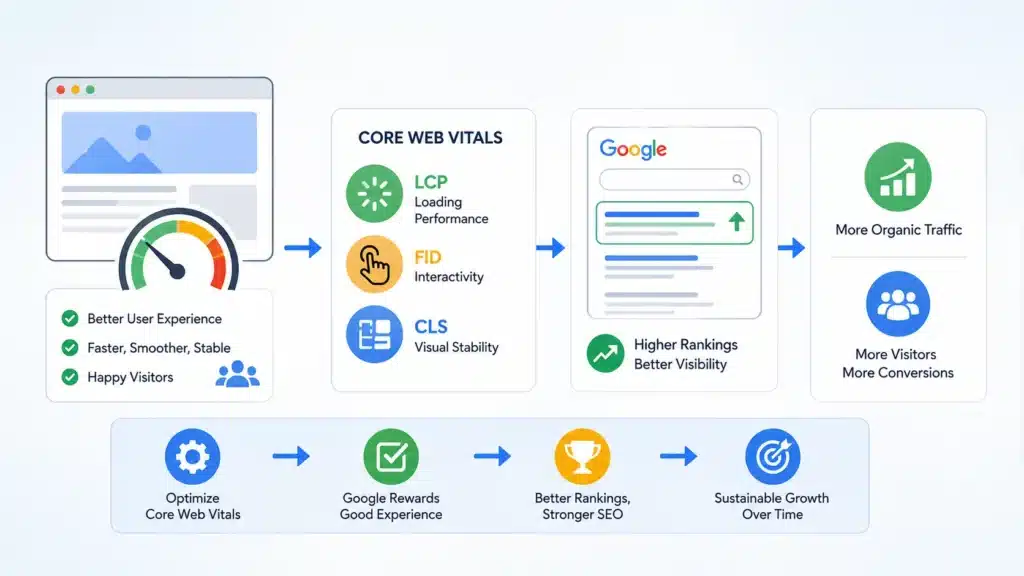
Core Web Vitals have become a significant factor in Google’s search ranking algorithm. Websites that perform well on these metrics are more likely to rank higher in search results, making them more visible to potential visitors. This integration into Google’s algorithm underscores the importance of Core Web Vitals in modern SEO strategies.
Google’s focus on Core Web Vitals aims to encourage webmasters to prioritize user experience. By rewarding sites that excel in these metrics, Google hopes to promote a better web for everyone. This shift means that traditional SEO practices like keyword optimization and backlink building are no longer sufficient on their own. To achieve and maintain high search rankings, you must also ensure your site performs well on Core Web Vitals.
Moreover, as Google’s algorithm continues to evolve, the importance of Core Web Vitals is likely to increase. Staying ahead of these changes and regularly monitoring your site’s performance on these metrics can give you a competitive edge. By prioritizing Core Web Vitals, you can ensure your site remains optimized for both user experience and search engine visibility.
Tools to Measure Your Core Web Vitals
Several tools are available to help you measure and analyze your site’s Core Web Vitals. These tools provide valuable insights into your site’s performance and identify areas that need improvement. By leveraging these tools, you can make data-driven decisions to enhance your site’s user experience and search rankings.
Google’s PageSpeed Insights is one of the most popular tools for measuring Core Web Vitals. It provides a detailed report on your site’s performance, including scores for LCP, FID, and CLS. The tool also offers actionable recommendations for improving these metrics. PageSpeed Insights is easy to use and provides both lab and field data, giving you a comprehensive view of your site’s performance.
Another valuable tool is Google’s Lighthouse, an open-source, automated tool for improving the quality of web pages. Lighthouse audits your site for performance, accessibility, SEO, and more, providing detailed reports and recommendations. It can be run from the command line or as a Chrome extension, making it highly versatile and accessible.
Common Issues Affecting Core Web Vitals and How to Fix Them
Several common issues can negatively impact your site’s Core Web Vitals. Identifying and addressing these issues is crucial for improving your site’s performance and user experience. By understanding the root causes of poor Core Web Vitals scores, you can implement effective solutions and optimize your site.
One common issue affecting LCP is slow server response times. When your server takes too long to respond, it delays the loading of the largest content element on the page. To address this, consider optimizing your server or using a Content Delivery Network (CDN) to reduce latency. Additionally, optimizing images and other large assets can help improve LCP scores.
For FID, a common issue is heavy JavaScript execution. When a page has too much JavaScript, it can delay the browser’s ability to respond to user interactions. To fix this, try minimizing and deferring JavaScript, splitting long tasks into smaller chunks, and using web workers to run scripts in the background. These strategies can help reduce FID and improve your site’s interactivity.
High CLS scores are often caused by dynamically injected content, such as ads or images without specified dimensions. To prevent layout shifts, ensure that all images and videos have fixed dimensions and be cautious with dynamically inserted content. Using CSS to reserve space for these elements can also help maintain visual stability.
Best Practices for Optimizing LCP (Largest Contentful Paint)
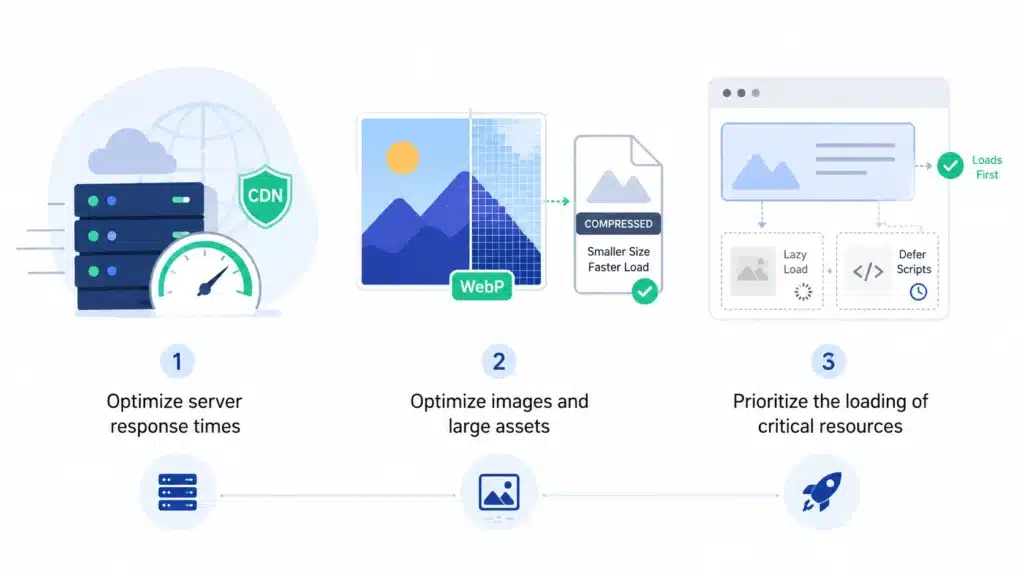
Optimizing Largest Contentful Paint (LCP) is crucial for enhancing your site’s loading performance. By following best practices, you can ensure that the largest content element on your page loads quickly, providing a better user experience. Here are some effective strategies for improving your LCP scores.
First, focus on optimizing your server response times. A slow server can significantly delay the loading of your site’s content. Consider using a high-performance hosting provider or a Content Delivery Network (CDN) to reduce latency. Additionally, optimizing your server’s configuration and using caching mechanisms can help improve response times.
Second, optimize your images and other large assets. Large images can significantly impact your LCP scores. Use modern image formats like WebP, which offer better compression without compromising quality. Additionally, ensure that your images are appropriately sized and compressed. Tools like ImageOptim and Squoosh can help you compress images effectively.
Third, prioritize the loading of critical resources. Ensure that the most important content on your page is loaded first. Use techniques like lazy loading for non-critical images and videos, and defer the loading of non-essential scripts. By prioritizing critical resources, you can improve your LCP scores and provide a faster loading experience for users.
Read Also: Search Everywhere Optimisation
Enhancing FID (First Input Delay) for Better User Experience
First Input Delay (FID) is a crucial metric for measuring your site’s interactivity. Enhancing FID ensures that users can interact with your site without frustrating delays. Here are some best practices for improving your FID scores and providing a better user experience.
One effective strategy is to minimize JavaScript execution. Heavy JavaScript can delay the browser’s ability to respond to user interactions. To reduce JavaScript execution time, consider deferring non-essential scripts, using asynchronous loading, and splitting long tasks into smaller chunks. Additionally, using web workers can help offload complex scripts to the background.
Another important practice is to optimize your main thread work. The main thread is responsible for handling user interactions, rendering the page, and executing JavaScript. By reducing the amount of work on the main thread, you can improve your FID scores. Use tools like Chrome DevTools to identify and optimize long tasks and resource-heavy scripts.
Lastly, consider using a performance budget. A performance budget sets limits on the amount of time and resources that can be used for various tasks, such as JavaScript execution, rendering, and loading. By adhering to a performance budget, you can ensure that your site remains responsive and interactive, leading to better FID scores and a more pleasant user experience.
Improving CLS (Cumulative Layout Shift) to Prevent Layout Shifts
Cumulative Layout Shift (CLS) measures the visual stability of your site. High CLS scores can be disruptive and frustrating for users, causing unexpected layout shifts. By implementing best practices, you can improve your CLS scores and provide a more stable and enjoyable user experience.
One effective strategy is to reserve space for dynamic content. Elements that are dynamically injected, such as ads or images, can cause significant layout shifts. By reserving space for these elements using CSS, you can prevent unexpected shifts and maintain visual stability. Ensure that all images and videos have specified dimensions to prevent layout changes during loading.
Another important practice is to avoid inserting new content above existing content. When new content is inserted above the fold, it can push existing content down, causing layout shifts. Instead, consider adding new content below the fold or using animations to smoothly introduce new elements. This approach helps maintain a stable layout and improves your CLS scores.
Lastly, monitor your site’s performance using tools like Chrome DevTools and Lighthouse. These tools can help you identify elements that cause layout shifts and provide recommendations for fixing them. By regularly monitoring and optimizing your site, you can ensure low CLS scores and a more stable user experience.
The Role of Mobile Optimization in Core Web Vitals
Mobile optimization plays a crucial role in Core Web Vitals. With the increasing use of mobile devices, ensuring that your site performs well on mobile is essential for providing a positive user experience. By focusing on mobile optimization, you can improve your Core Web Vitals scores and enhance your site’s performance across all devices.
One key aspect of mobile optimization is ensuring fast loading times. Mobile devices often have slower network connections and less processing power compared to desktops. To optimize for mobile, consider using a lightweight design, optimizing images and other assets, and leveraging techniques like lazy loading. Additionally, using a mobile-friendly layout and responsive design ensures that your site looks and performs well on all screen sizes.
Another important factor is touch responsiveness. Mobile users interact with websites through touch, so it’s crucial to ensure that your site is responsive to touch inputs. Optimize your site’s interactivity by reducing JavaScript execution time, minimizing main thread work, and using touch-friendly design elements. This approach helps improve FID scores and provides a better user experience on mobile.
Lastly, consider the visual stability of your mobile site. Layout shifts can be particularly disruptive on smaller screens, where even minor shifts are more noticeable. Ensure that your mobile site has low CLS scores by reserving space for dynamic content, specifying image dimensions, and avoiding inserting new content above existing content. By focusing on mobile optimization, you can enhance your site’s Core Web Vitals scores and provide a better user experience across all devices.
Conclusion: Taking Action to Improve Your Site’s Performance
Mastering Core Web Vitals is essential for unlocking the true potential of your website. By understanding and optimizing the key metrics of LCP, FID, and CLS, you can elevate your site’s performance and enhance user experience. The integration of Core Web Vitals into Google’s search ranking algorithm makes them even more critical for achieving high search rankings and gaining a competitive edge.
To improve your site’s Core Web Vitals, start by measuring your current performance using tools like PageSpeed Insights, Lighthouse, and Chrome DevTools. Identify common issues affecting your scores and implement best practices to address them. Optimize your server response times, minimize JavaScript execution, and ensure visual stability by reserving space for dynamic content.
Additionally, focus on mobile optimization to ensure that your site performs well across all devices. By prioritizing fast loading times, touch responsiveness, and visual stability, you can provide a positive user experience for mobile users. Regularly monitor your site’s performance and make data-driven decisions to continuously improve your Core Web Vitals scores.
Taking action to master Core Web Vitals not only enhances user experience but also boosts your site’s visibility in search results. By prioritizing these essential metrics, you can create a faster, more responsive, and visually stable site that delights users and drives better engagement and conversions. Start optimizing your Core Web Vitals today and unlock the full potential of your website!