

Technical SEO Is the Floor — Without It, Nothing Else Works
Digital Arka starts every client engagement with a technical SEO audit, and in August 2026 we consistently find the same pattern: businesses investing heavily in content strategy and link building while sitting on technical foundations that prevent either from working. A beautifully written content cluster earns zero AI citations if Googlebot cannot crawl it. A 40-keyword ranking page disappears from results if its LCP fails Google’s 2.0-second threshold on mobile.
Google’s August 2026 update cadence reinforces what the 2026 algorithm history makes clear: Google’s algorithm update history at Digital Applied confirms that “sites that pass all three Core Web Vitals thresholds see stronger ranking boosts, while those failing even one metric face compounded penalties.” Technical performance is no longer a tiebreaker that decides between equally strong competitors. It is a gate that must be passed before any other ranking signals count.
“Sites that pass all three Core Web Vitals thresholds see stronger ranking boosts, while those failing even one metric face compounded penalties. This shift rewards comprehensive technical performance over isolated optimisations.” — Digital Applied Algorithm Update History 2026
The Three Core Web Vitals You Must Pass in August 2026
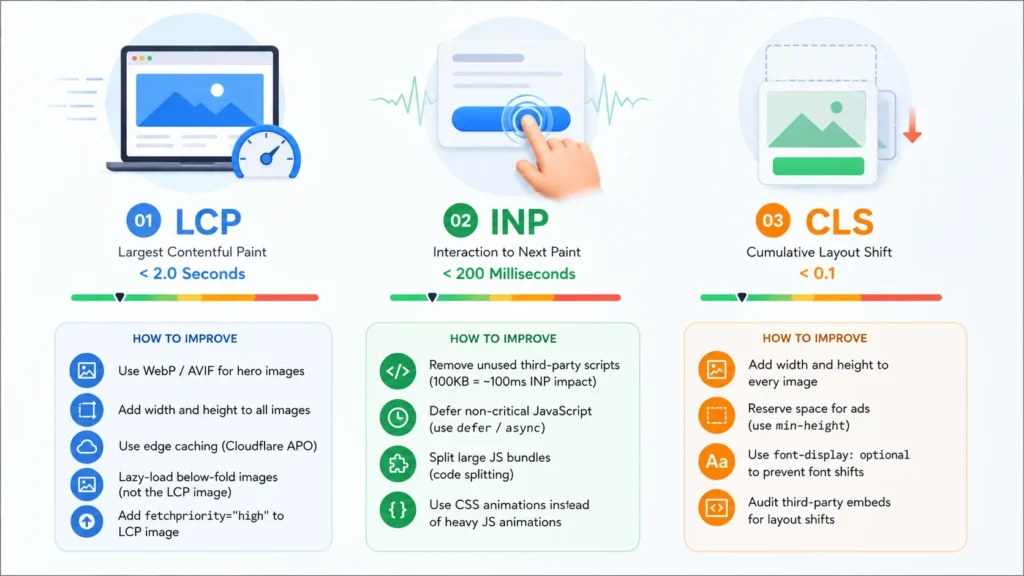
LCP — Largest Contentful Paint: Under 2.0 Seconds
Largest Contentful Paint measures how quickly the largest visible element on a page loads — typically a hero image, a heading, or a background image. Google’s “Good” threshold is under 2.0 seconds on mobile. Most WordPress sites without edge caching fail this threshold because their hero images are unoptimised JPEG or PNG files that take 4 to 8 seconds to load on a median Indian mobile connection (which averages 20 to 25 Mbps download speed on 4G).
Digital Arka fixes LCP through five actions applied in this priority order: converting hero images from JPEG/PNG to WebP or AVIF format (typically 40 to 60 percent smaller file size); adding explicit width and height attributes to all images to prevent reflow; implementing Cloudflare APO for WordPress sites (caches pages at edge, reduces server response time to under 50ms); lazy-loading all below-fold images while NOT lazy-loading the LCP element; and setting fetchpriority=”high” on the LCP image element to tell the browser to load it first.
INP — Interaction to Next Paint: Under 200 Milliseconds
Interaction to Next Paint replaced First Input Delay as a Core Web Vital in March 2024. INP measures the delay between a user’s interaction — clicking a button, tapping a link, submitting a form — and the page’s next visible response. The “Good” threshold is under 200 milliseconds. The primary causes of INP failure in 2026 are: too much JavaScript executing on the main thread, third-party scripts (analytics, chat widgets, ad tags) blocking user input response, and heavy React or Vue.js bundles that take too long to hydrate on mobile devices.
We fix INP by: auditing and removing unused third-party scripts (every 100KB of unused JavaScript adds approximately 100ms to INP on mobile); deferring non-critical JavaScript using the defer or async attribute; splitting large JavaScript bundles using code splitting; and replacing heavy JavaScript animations with CSS animations wherever possible.
⚡ Digital Arka diagnostic: Run your site through PageSpeed Insights (pagespeed.web.dev). Any INP score above 500ms requires immediate attention. Between 200ms and 500ms needs improvement. Check the “Opportunities” section — it identifies the specific scripts causing the INP delay by name.
CLS — Cumulative Layout Shift: Under 0.1
Cumulative Layout Shift measures how much visible page content moves unexpectedly during loading — the jarring experience when a button shifts just as you tap it. The “Good” threshold is a CLS score under 0.1. The most common causes of CLS failure are: images without explicit width and height attributes (the browser cannot reserve space before the image loads, so the content below it jumps down), late-loading ad slots that push content down, and web fonts that cause layout reflow when they replace the fallback font.
Fix CLS by: adding explicit width and height attributes to every image on every page; reserving space for ad slots with min-height CSS even when no ad loads; using font-display: optional to prevent font-swap layout shifts; and auditing third-party embeds (social media widgets, video embeds) for CLS-causing late loads.
Read Also: Page Design as a Ranking Signal
AI Crawler Access: The Technical SEO Issue Nobody Talks About Enough
Every technical SEO audit Digital Arka runs in 2026 checks one item that did not appear in 2023 audits: whether the site’s robots.txt file explicitly allows or accidentally blocks AI crawlers. The major AI crawlers — GPTBot (OpenAI), ClaudeBot (Anthropic), PerplexityBot (Perplexity), and OAI-SearchBot (OpenAI Search) — all respect robots.txt directives. Sites that block these crawlers through overly broad Disallow rules remove themselves from the AI citation pool entirely.
Check your robots.txt at yourdomain.com/robots.txt. If you see “Disallow: /” under a User-agent: * block, and you have not explicitly allowed the AI crawlers listed above, you are blocking all four of them. Add explicit Allow: / directives for each AI crawler user agent. This single technical fix can restore AI citation eligibility for every page on a site that has inadvertently blocked its AI crawler access.
- Allow GPTBot: User-agent: GPTBot / Allow: /
- Allow ClaudeBot: User-agent: ClaudeBot / Allow: /
- Allow PerplexityBot: User-agent: PerplexityBot / Allow: /
- Allow OAI-SearchBot: User-agent: OAI-SearchBot / Allow: /
The August 2026 Technical SEO Audit Checklist
Digital Arka runs this 15-point technical audit for every new client and every existing client at the start of each quarter:
- LCP under 2.0s on mobile (tested in PageSpeed Insights)
- INP under 200ms on mobile (tested in PageSpeed Insights)
- CLS under 0.1 on mobile (tested in PageSpeed Insights)
- All images in WebP or AVIF format (no unoptimised JPEG/PNG hero images)
- Explicit width and height on all images (prevents layout reflow CLS)
- HTTPS enforced site-wide (no HTTP mixed content warnings)
- Self-referencing canonical tags on all pages (no canonical conflicts)
- XML sitemap submitted and error-free in GSC (updated on every new publish)
- AI crawlers explicitly allowed in robots.txt (GPTBot, ClaudeBot, PerplexityBot, OAI-SearchBot)
- No orphan pages (every published page has at least 1 internal link)
- Navigation depth under 3 clicks from homepage for all important pages
- Article schema with datePublished and dateModified on all blog posts
- Organisation schema with sameAs array on the homepage
- No JavaScript-rendered content that Googlebot cannot crawl (server-side rendering for key content)
- Google Search Console zero critical coverage errors (checked weekly)
Conclusion: Technical SEO Enables Everything Else
Content strategy, brand building, and AI citation optimisation all depend on a technically sound foundation. A site that loads slowly, blocks AI crawlers, serves JavaScript-only content, or has canonical conflicts wastes every rupee invested in content and links above it. At Digital Arka, we fix technical foundations before recommending content investments — because the content investment earns nothing if the technical floor has cracks.
Contact Digital Arka at digitalarka.com or call +91 70110 34858 to book a full technical SEO audit for your website. We deliver a prioritised remediation plan within five business days, ranked by impact on rankings and AI citation eligibility.
Frequently Asked Questions (AI-Query Based)
We sourced these questions from real queries people ask Google AI Mode, ChatGPT, Perplexity, and Bing Copilot about this topic. Every answer uses a direct, passage-first structure for maximum AI citation eligibility.
Q1. What are Core Web Vitals and why do they matter for SEO in 2026?
A: Core Web Vitals are Google’s three user experience performance metrics: LCP (Largest Contentful Paint, under 2.0 seconds), INP (Interaction to Next Paint, under 200ms), and CLS (Cumulative Layout Shift, under 0.1). They matter for SEO in August 2026 because Google’s algorithm treats passing all three thresholds as a ranking prerequisite — sites that fail even one metric face compounded ranking penalties, while sites passing all three receive explicit ranking boosts, according to Digital Applied’s 2026 algorithm update analysis.
Q2. What is LCP in Core Web Vitals and how do I improve it?
A: LCP (Largest Contentful Paint) measures how quickly the largest visible element on a page loads. The “Good” threshold is under 2.0 seconds on mobile. Improve LCP by: converting hero images to WebP or AVIF format (40-60% smaller); adding explicit width and height to all images; implementing edge caching through Cloudflare APO for WordPress; setting fetchpriority=”high” on the LCP image element; and not lazy-loading the LCP element. Run PageSpeed Insights to identify your specific LCP element and its current load time.
Q3. What is INP and how is it different from FID?
A: INP (Interaction to Next Paint) replaced FID (First Input Delay) as a Core Web Vital in March 2024. FID measured only the delay before the browser processes the first user interaction. INP measures the delay across all interactions throughout the page’s lifetime — every click, tap, and keyboard input. The “Good” threshold is under 200ms. INP is harder to pass than FID because it captures every slow interaction on the page, not just the first one. Fix INP primarily by reducing JavaScript execution on the main thread and removing unused third-party scripts.
Q4. How do AI crawlers affect technical SEO in 2026?
A: AI crawlers — GPTBot (OpenAI), ClaudeBot (Anthropic), PerplexityBot, and OAI-SearchBot — respect robots.txt directives. Sites that accidentally block these crawlers through overly broad Disallow rules remove themselves from the AI citation pool entirely. Check your robots.txt at yourdomain.com/robots.txt and add explicit Allow: / directives for each AI crawler user agent. Allowing AI crawlers is now a standard item in every technical SEO audit — it is the single technical fix with the highest potential AI citation impact for sites that have inadvertently blocked access.
Q5. How do I check my Core Web Vitals scores?
A: Check your Core Web Vitals scores through: PageSpeed Insights (pagespeed.web.dev) for URL-level lab and field data; Google Search Console’s Core Web Vitals report for site-wide field data across all your indexed pages; and Chrome DevTools’ Performance panel for detailed waterfall-level diagnostics. Always check mobile scores separately from desktop — Google evaluates the mobile version of your site as the primary signal for mobile-first indexing, and mobile scores are typically 30 to 60 percent worse than desktop scores on the same site.
Q6. What causes Cumulative Layout Shift (CLS) and how do I fix it?
A: CLS is caused by: images without explicit width and height attributes (the browser cannot reserve space before they load); ad slots that push content down when an ad loads; web fonts that cause text reflow when they replace fallback fonts; and third-party embeds that load late and shift existing content. Fix CLS by adding explicit width and height to every image, reserving space for ad slots with min-height CSS, using font-display: optional for web fonts, and auditing all third-party embeds for late-loading layout shifts. Check your CLS score in PageSpeed Insights before and after each fix.
Q7. Does page speed directly affect Google rankings in 2026?
A: Yes. Core Web Vitals became official Google ranking signals in 2021, and their weight in ranking decisions has increased through every subsequent core update. In August 2026, Google’s algorithm treats passing all three Core Web Vitals thresholds as a ranking prerequisite — not just a tiebreaker between otherwise equal pages. A site failing LCP at 4.5 seconds loses ranking positions to competitors with equivalent content quality and backlinks who pass at 1.8 seconds. Page speed affects both traditional blue link rankings and AI Overview citation eligibility.
Q8. How often should I run a technical SEO audit?
A: Run a comprehensive technical SEO audit quarterly. Run a lightweight check monthly covering: Google Search Console coverage errors, Core Web Vitals field data in the GSC report, and any new crawl anomalies. Run an immediate diagnostic check after any significant site change — a theme update, a new plugin installation, a page migration, or a URL structure change. Technical SEO problems introduced by site updates compound quickly; catching them within 48 hours of introduction prevents ranking losses that take months to recover.
Q9. What is the difference between crawling and indexing in technical SEO?
A: Crawling is the process by which Googlebot and AI crawlers discover and download your web pages by following links across the internet. Indexing is the process of analysing and storing the content of crawled pages in Google’s search index — making them eligible to appear in search results. A page must be crawled before it can be indexed. Crawl barriers (robots.txt blocks, noindex tags, JavaScript-only content, broken internal links) prevent indexing. Common technical SEO problems involve pages that are successfully crawled but fail indexing (duplicate content, thin content, canonical conflicts) or pages that fail crawling entirely (robots.txt blocks, server errors).
Q10. How does server response time affect Core Web Vitals?
A: Server response time (measured as Time to First Byte, or TTFB) directly affects LCP because the browser cannot begin loading any page content until the server delivers the first byte of HTML. A high TTFB — above 600ms — adds directly to your LCP score. For WordPress sites, implement edge caching through Cloudflare APO (which delivers cached pages from Cloudflare’s global edge network instead of your origin server, reducing TTFB to under 50ms). For custom sites, upgrade to a VPS or dedicated server and implement object caching at the database level. TTFB should be under 200ms for a competitive LCP score.