
Your Rank Tracker Has Been Lying to You — And Ubersuggest Just Fixed It
At Digital Arka, we hear the same complaint from clients in Delhi NCR every single month: “Our rank tracker shows us at position one, but our traffic is down 30 percent. What is happening?” Until recently, the honest answer was: “Your tracker measures position numbers. Google’s SERP measures pixels. Those two things are no longer the same.”
Ubersuggest, the SEO platform built by Neil Patel and the team at NP Digital, just launched Pixel Rank Tracking — a new feature accessible at app.neilpatel.com/en/pixel-rank-tracking — and it directly solves this problem. Instead of telling you that you rank at position three and leaving you to figure out why that position earns no clicks, Pixel Rank Tracking tells you exactly how many pixels from the top of the search results page your listing actually appears. That number is what determines whether a user ever sees you — and Ubersuggest now tracks it.
This blog post explains what pixel rank tracking is, why the number matters more than position in August 2026, how Ubersuggest’s new feature works, and exactly what Digital Arka recommends you do with the data it generates.
“See how visible your rankings really are by measuring the pixel distance from the top of the search results.” — Ubersuggest Pixel Rank Tracking feature description, app.neilpatel.com/en/pixel-rank-tracking
What Is Pixel Rank Tracking? The Concept Explained
Pixel rank tracking is the practice of measuring a webpage’s position on the search results page in terms of vertical pixels from the top, rather than by a simple numeric rank number. Instead of asking “what position am I?” it asks: how far down must a user scroll before they see my content?
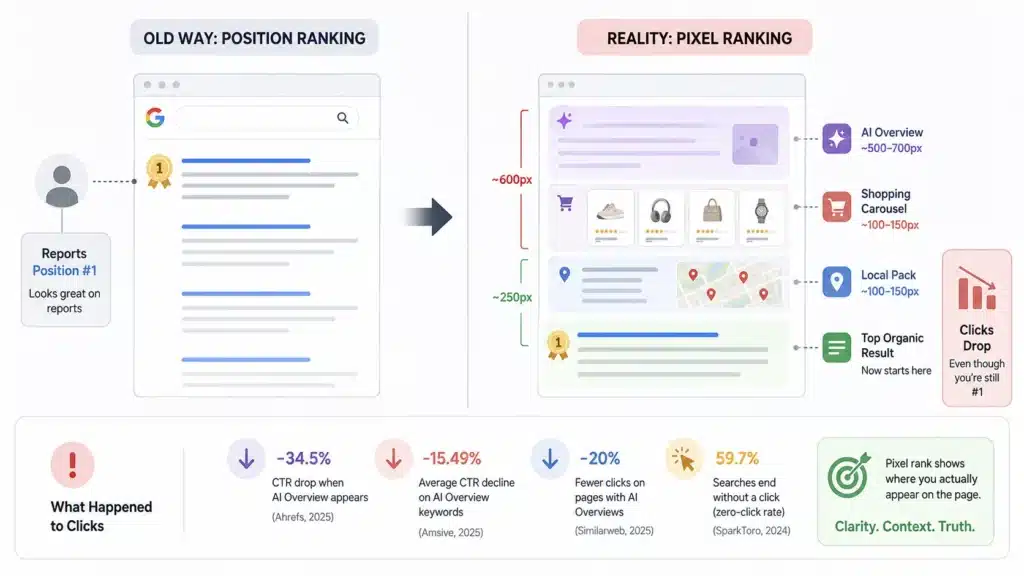
Traditional rank tracking treats every position one as identical. But consider what happens on a modern Google SERP for a competitive query in August 2026. Google may display at the very top: a row of Google Ads (typically 150 to 250 pixels tall), an AI Overview synthesising an answer from multiple sources (500 to 700 pixels on desktop, more on mobile), a People Also Ask accordion with four expanded questions (another 300 to 400 pixels), and a Featured Snippet card. By the time your “position one” organic blue link appears, it sits 900 to 1,100 pixels below the top of the page. On a standard 1,080-pixel desktop monitor, that pushes your result entirely off-screen. The user sees nothing of yours without deliberate scrolling.
⚠️ Key insight: A #1 organic ranking buried beneath an AI Overview, ads, and a People Also Ask block can sit 800 to 1,100 pixels from the top of the page on desktop — completely below the fold. Pixel rank tracking reveals this. Position-number tracking does not.
seoClarity’s research defines “above the fold” as approximately 800 pixels on desktop and 400 pixels on mobile (seoClarity, 2025). Any result appearing beyond those thresholds requires deliberate scrolling — and research consistently shows that most users never scroll past the first screenful on a search results page. Pixel rank tracking is the metric that captures this reality. Ubersuggest now brings it inside the tool that thousands of Delhi NCR businesses already use for their SEO work.
Why the Old Metric Broke — And When It Happened
Position tracking worked reliably as a visibility proxy for roughly 20 years because the Google SERP was relatively stable. Ten blue links appeared predictably. Position one sat close to the top. The first result earned approximately 28 to 32 percent of all clicks. The relationship between position and traffic was strong enough that agencies built entire reporting practices on it.
That relationship broke down in stages. Featured Snippets (2014) pushed organic results below an extracted answer box. Knowledge Panels (2012 onwards) consumed the right rail. Shopping Carousels (2012) pushed organic results below product images for commercial queries. Local Packs (2015) inserted three map listings above organic results for any query with local intent. And then — most dramatically — AI Overviews (2023 to 2026) began consuming 500 to 700 pixels of prime screen real estate for any informational query, which represents the majority of all searches.
The data on what this cumulative shift did to CTR is unambiguous:
- Ahrefs (2025): when an AI Overview appears, the top-ranking page’s CTR drops by 34.5 percent on average compared to similar queries without an AI Overview.
- Amsive (2025): the average CTR decline on keywords with AI Overviews reaches 15.49 percent.
- Similarweb (2025): 20 percent fewer clicks occur on search result pages that include AI Overviews.
- SparkToro (2024): 59.7 percent of Google searches end without any click to any website — the zero-click rate has crossed the majority threshold.
Position-number tracking does not capture any of this. A rank tracker that shows you at position one for a query where an AI Overview consumes 600 pixels above your listing reports a technically true but strategically misleading number. Pixel rank tracking corrects the mislead.
“Rankings Up, Clicks Down: Multiple independent studies confirm the paradox. You maintain high rankings, but organic traffic and click-through rates drop. Pixel rank tracking explains why. Position tracking cannot.” — NAV43 Pixel Rank Tracking Analysis, May 2026
Ubersuggest’s Pixel Rank Tracking Feature: What It Does and How to Use It
Ubersuggest launched Pixel Rank Tracking at app.neilpatel.com/en/pixel-rank-tracking as part of its ongoing platform expansion into AI-era SEO metrics. The feature measures the actual vertical pixel distance from the top of the Google SERP to where your organic listing appears, for each keyword you track. It delivers this data separately for desktop and mobile — a critical distinction because mobile SERPs have “above the fold” thresholds of approximately 400 pixels, nearly half the desktop threshold of 800 pixels.
Here is what the Ubersuggest Pixel Rank Tracking feature delivers:
- Pixel distance from top: the exact number of pixels your listing sits below the top of the SERP for each tracked keyword, measured in the Ubersuggest dashboard.
- Desktop vs mobile split: separate pixel measurements for desktop (above-fold threshold ~800px) and mobile (above-fold threshold ~400px), reflecting that mobile SERPs push content further down due to small screens and more stacked SERP features.
- Above-fold rate tracking: identifies what percentage of your tracked keywords place your listing within the visible first screen, giving you an aggregate visibility health score beyond position numbers.
- SERP feature impact visibility: because pixel distance accounts for AI Overviews, ads, Featured Snippets, People Also Ask blocks, and local packs, the metric inherently reveals which SERP features are eating into your above-fold presence.
- CTR correlation data: Ubersuggest surfaces the relationship between pixel position and actual click-through rate data, helping you connect visibility metrics to business outcomes.
⚡ Digital Arka how-to: Log in to Ubersuggest at app.neilpatel.com, navigate to the Pixel Rank Tracking section, select your project or enter your domain, and add the keywords you want to track. Ubersuggest will display both the numeric position and the pixel distance for each keyword, with colour-coding that highlights keywords where your listing falls below the fold threshold for desktop or mobile.
Pixel Rank vs. Traditional Position Tracking: Why Both Still Matter
Digital Arka does not recommend abandoning position tracking. We recommend adding pixel tracking alongside it — because the two metrics tell different stories and both stories matter.
What position tracking tells you
Position tracking tells you where Google ranks your page relative to competitors in the algorithm’s assessment of quality, relevance, and authority. A position one ranking still indicates that Google considers your page the most relevant and authoritative result for that query. This algorithmic signal has value: it reflects the cumulative quality of your content, backlinks, technical SEO, and E-E-A-T signals. A page rising from position eight to position three signals genuine quality improvement, regardless of where it sits in pixels.
What pixel tracking tells you
Pixel tracking tells you whether that algorithmic assessment translates into actual user visibility on a given query. A page at position three for a query that triggers a large AI Overview and a local pack may sit at 950 pixels — well below the fold, invisible to most users without scrolling. The same page at position three for a query with no SERP features may sit at 250 pixels — prominently visible. Pixel tracking distinguishes between these two scenarios that position tracking treats identically.
The two scenarios where pixel tracking changes your strategy immediately
Ubersuggest’s Pixel Rank Tracking adds the most strategic value in two specific situations that Digital Arka identifies in client accounts regularly:
Situation one: you rank in positions one to three but earn lower CTR than expected. Pixel tracking reveals that a SERP feature pushes your listing below the fold. The response is to pursue above-fold visibility through Featured Snippet optimisation, AI Overview citation eligibility, or FAQ schema — not to chase a higher position that would still sit below the fold due to the features above it.
Situation two: you rank in position six or seven but earn higher CTR than position three pages on other queries. Pixel tracking may reveal that these position-six pages appear at 400 pixels (above the fold) on queries with no SERP features, while the position-three pages sit at 900 pixels buried under an AI Overview. The pixel metric explains the CTR discrepancy that position alone cannot.
“Traditional rank tracking treats all #1 positions identically. But a search result sitting at 200 pixels from the top delivers vastly different performance than one buried at 1,100 pixels. Pixel ranking captures this nuance.” — NAV43 / seoClarity, 2025/2026
Share of Squares: The AI Overview Metric That Pairs With Pixel Tracking
When Ubersuggest surfaces a query where your listing sits at 800-plus pixels due to an AI Overview consuming the top of the SERP, the immediate question becomes: does your content appear inside that AI Overview as a cited source? If you are already cited inside the AI Overview — one of the three to five “source squares” that Google shows as references inside its synthesised answer — you gain above-fold brand presence even though your organic listing sits below the fold.
NAV43’s 2025/2026 pixel rank tracking analysis introduced the concept of “share of squares” — the percentage of AI Overviews for your target queries that include your site as a cited source. Share of squares is the complement to pixel rank tracking: pixel tracking tells you whether your organic listing sits above or below the fold; share of squares tells you whether your content earns above-fold presence inside the AI Overview block that displaced your organic listing.
Google’s own documentation confirms that all links within an AI Overview carry the same rank position — position one — since the entire AI block occupies the top slot. This means a site cited inside an AI Overview earns a position-one signal in Google Search Console for that query, even if its traditional organic listing sits at position seven. For SEO reporting, this creates a critical nuance: GSC average positions for queries where you earn AI Overview citations will appear inflated (closer to position one than your actual organic rank). Pixel tracking plus share-of-squares tracking together explains this inflation correctly.
📊 Digital Arka tracking framework: We monitor three metrics simultaneously for every priority keyword — (1) numeric position, (2) pixel distance from SERP top, and (3) AI Overview citation status. These three numbers together tell the complete visibility story that any single metric alone cannot.
How Digital Arka Uses Ubersuggest Pixel Rank Tracking for Client Strategy
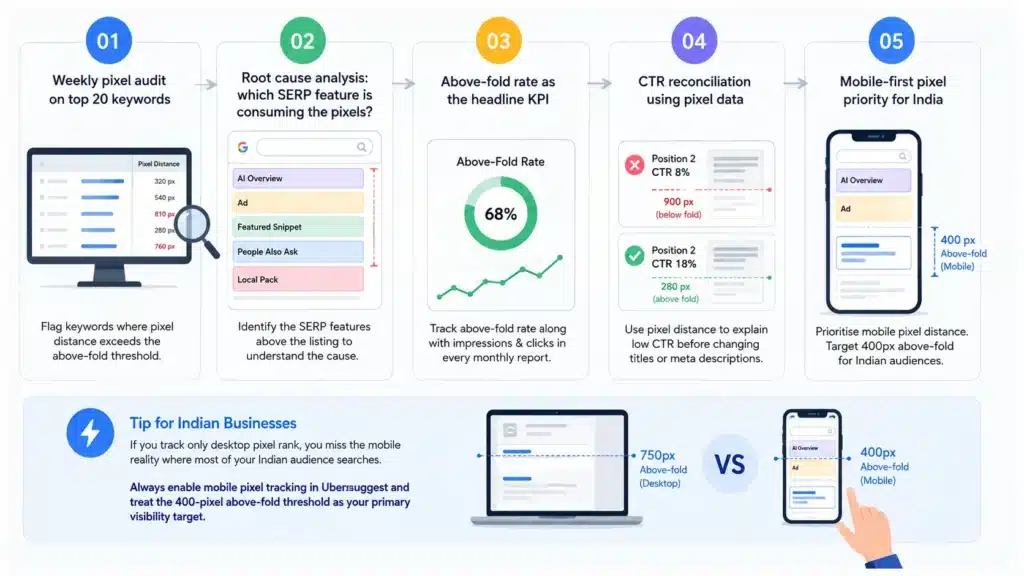
Since Ubersuggest launched Pixel Rank Tracking, Digital Arka has integrated it into every client monthly SEO report. Here is the specific workflow we follow:
01 Weekly pixel audit on top 20 priority keywords
Every Monday, we pull pixel distance data from Ubersuggest for the top 20 keywords by business value in each client account. We flag any keyword where the pixel distance exceeds 750 pixels on desktop or 350 pixels on mobile — the threshold at which most users need to scroll to see the listing. These flagged keywords enter an optimisation queue.
02 Root cause analysis: which SERP feature is consuming the pixels?
For every flagged keyword, we manually check the live SERP to identify which features sit above the organic listing: ads, AI Overview, Featured Snippet, People Also Ask, local pack, or shopping carousel. The feature determines the response strategy. An AI Overview consuming 600 pixels requires an AI citation optimisation response (FAQPage schema, direct-answer content structure). A local pack consuming 400 pixels requires a Google Business Profile optimisation response. Pixel tracking identifies the problem; manual SERP analysis identifies the cause.
03 Above-fold rate as the headline KPI
We report above-fold rate — the percentage of tracked keywords where the client’s listing appears within the above-fold threshold — as a headline KPI alongside impressions and clicks in every monthly SEO report. A rising above-fold rate indicates that our SERP feature optimisation work (Featured Snippets, AI citations, schema) is successfully reclaiming above-fold real estate. A falling above-fold rate indicates that new SERP features are expanding and eating into previously above-fold positions — which is valuable intelligence that justifies strategy shifts before traffic drops appear.
04 CTR reconciliation using pixel data
When Google Search Console shows a CTR lower than the benchmark for a given position (e.g., a position-two listing earning 8 percent CTR instead of the 15 to 20 percent expected for position two), we use Ubersuggest’s pixel data to check whether the low CTR reflects a below-fold pixel position. If the position-two listing sits at 900 pixels due to SERP features, the low CTR is explained and expected — not a signal that the page title or meta description needs changing. Without pixel data, we would waste time A/B testing title tags on a page whose low CTR comes entirely from pixel position, not click appeal.
05 Mobile-first pixel priority for Indian client accounts
India’s mobile usage rate exceeds 70 percent of all web traffic. For Delhi NCR clients, mobile pixel tracking is significantly more important than desktop. Mobile SERPs have an above-fold threshold of approximately 400 pixels — less than half the desktop threshold — and display SERP features with even more aggressive stacking due to narrow screen widths. We always prioritise mobile pixel distance over desktop pixel distance when making optimisation decisions for Indian business clients.
⚡ Digital Arka tip for Indian businesses: If you track only desktop pixel rank, you miss the mobile reality where most of your Indian audience searches. Always enable mobile pixel tracking in Ubersuggest and treat the 400-pixel above-fold threshold as your primary visibility target.
5 Actions to Take When Pixel Tracking Reveals Below-Fold Rankings
When Ubersuggest’s Pixel Rank Tracking reveals that your listings sit below the fold on important keywords, these five responses address the most common root causes systematically.
Action 1 — Pursue Featured Snippet optimisation for AI Overview-displaced keywords
When an AI Overview consumes the top 500 to 700 pixels of a SERP and pushes your organic listing below the fold, pursue Featured Snippet eligibility for that keyword. Featured Snippets appear inside or immediately alongside AI Overviews on many queries — placing your content inside the above-fold AI block rather than beneath it. Achieve Featured Snippet eligibility by restructuring the target page’s section opening as a direct, 40 to 60 word answer to the query, and adding the query’s exact phrasing as an H2 heading above the answer.
Action 2 — Optimise Google Business Profile for local-pack displaced keywords
When a local pack (three map listings) consumes 300 to 400 pixels above your organic listing, optimise your Google Business Profile to appear inside that local pack rather than beneath it. For Delhi NCR businesses, local pack inclusion requires: complete GBP with accurate categories and service listings, a consistent review velocity of 10 or more new reviews per month, and weekly GBP posts. A listing inside the local pack sits at approximately 150 pixels from the top — far above the fold — versus the organic listing at 600 to 700 pixels beneath it.
Action 3 — Add FAQPage schema to earn People Also Ask inclusion
When People Also Ask accordions consume 300 to 400 pixels above your organic listing, pursue PAA inclusion by adding FAQPage schema to your page’s FAQ section and structuring each FAQ answer to directly and concisely answer a related question. PAA inclusion places your content in an above-fold accordion that users actively engage with — a position that earns clicks from users who would never scroll to your organic listing beneath it.
Action 4 — Target long-tail keywords with fewer SERP features for better pixel positions
Head terms and commercial queries attract the most SERP features — more ads, more AI Overviews, more local packs. Long-tail keywords with specific intent (three to five word phrases, question-based queries) often display minimal SERP features, allowing organic listings to sit much higher in pixel terms. When pixel tracking reveals that your head-term rankings sit consistently below the fold, shift content investment toward long-tail cluster articles that earn above-fold organic positions on queries where SERP feature competition is lower.
Action 5 — Correlate pixel improvements with CTR to justify strategy to stakeholders
The most powerful use of pixel rank data for Digital Arka is in client communication. When a client questions why their rankings stayed the same but their CTR improved, pixel tracking provides the answer: their listings moved above the fold because a SERP feature that was pushing them down disappeared or they earned a Featured Snippet. When a client questions why their rankings stayed the same but their CTR fell, pixel tracking provides the other answer: a new AI Overview expanded above them. Data-driven client communication using pixel metrics builds trust that position-only reporting cannot.
Read More: Search Everywhere Optimisation
Conclusion: Ubersuggest’s Pixel Rank Tracking Is the Metric the Modern SERP Demands
For the past decade, SEO reporting centred on one number: position. In August 2026, with AI Overviews consuming up to 700 pixels above organic results, with local packs stacking 400 pixels of map listings, and with zero-click rates crossing 60 percent of all Google searches, position alone no longer predicts whether a user sees your listing. Pixel rank does.
Ubersuggest’s Pixel Rank Tracking feature gives every business using Neil Patel’s platform the ability to measure actual SERP visibility — not algorithmic position — for every keyword they track. At Digital Arka, we use it weekly for every client account. We report above-fold rate as a headline KPI. We use pixel data to explain CTR anomalies that position numbers cannot account for. And we use it to identify exactly which SERP feature displaces each below-fold listing, so we can respond with the right optimisation — Featured Snippet pursuit, GBP optimisation, FAQPage schema, or long-tail keyword expansion.
The businesses that add pixel tracking to their rank tracking stack in August 2026 gain a measurable strategic advantage over every competitor still reporting position numbers as their primary visibility metric. Contact Digital Arka at digitalarka.com or call +91 70110 34858 to integrate Ubersuggest Pixel Rank Tracking into your monthly SEO reporting framework today.
Frequently Asked Questions About Ubersuggest Pixel Rank Tracking
These questions reflect real AI-engine queries about pixel rank tracking in SEO. Every answer uses a direct, passage-first structure for maximum AI citation eligibility.
Q1. What is pixel rank tracking in Ubersuggest?
A: Pixel rank tracking in Ubersuggest measures the vertical pixel distance from the top of Google’s search results page to where your website listing appears, rather than reporting only a numeric position number. The feature is available at app.neilpatel.com/en/pixel-rank-tracking. It reveals true SERP visibility by accounting for AI Overviews, ads, Featured Snippets, and local packs that push organic listings below the visible first screen — helping you understand why traffic drops even when your position stays stable.
Q2. Why does pixel rank matter more than position number in 2026?
A: Pixel rank matters more than position number in 2026 because Google’s SERP now places AI Overviews (500 to 700 pixels tall), paid ads (150 to 250 pixels), Featured Snippets, and local packs above organic results. A #1 organic ranking can sit 800 to 1,100 pixels from the top of the page — entirely below the fold on most screens. Ahrefs data confirms that when an AI Overview appears, the top-ranking page’s CTR drops 34.5 percent on average. Pixel rank captures this visibility loss; position tracking does not.
Q3. What is the above-the-fold threshold for Google search results?
A: The above-the-fold threshold for Google search results is approximately 800 pixels on desktop and 400 pixels on mobile, according to seoClarity research. Content appearing within these pixel distances from the top of the SERP is visible to users without scrolling. Content appearing beyond these thresholds requires deliberate scrolling to see — and research shows most users do not scroll past the first screenful. Pixel rank tracking flags any listing appearing beyond these thresholds as below-fold and requiring an optimisation response.
Q4. How do AI Overviews affect pixel rank and organic CTR?
A: AI Overviews typically consume 500 to 700 pixels of screen space above organic results. When an AI Overview appears on a query where your listing previously sat at 200 pixels (comfortably above the fold), it pushes your listing to 700 to 900 pixels below the top — forcing users to scroll to reach you. Ahrefs reports a 34.5 percent average CTR drop when AI Overviews appear. Amsive data shows a 15.49 percent average CTR decline. Pixel rank tracking reveals this displacement; traditional position tracking shows no change since your numeric rank did not move.
Q5. Does pixel rank tracking replace traditional rank tracking?
A: No. Pixel rank tracking complements traditional rank tracking — it does not replace it. Position numbers remain valuable for measuring algorithmic authority, competitive benchmarking, and historical ranking trends. Pixel rank adds the crucial context of whether that position delivers actual above-fold visibility to real users. Use both metrics together: position to measure Google’s algorithmic assessment of your content quality, and pixel rank to measure whether that assessment translates into user-visible SERP presence. Ubersuggest shows both simultaneously.
Q6. What is “share of squares” and how does it relate to pixel rank?
A: Share of squares is the percentage of AI Overviews for your target queries where your site appears as a cited source inside Google’s generated answer. It directly relates to pixel rank because when an AI Overview displaces your organic listing below the fold, appearing as a cited source inside that AI Overview restores above-fold brand visibility — your content appears in the AI block itself rather than beneath it. Share of squares and pixel rank are complementary metrics: pixel rank measures whether your organic listing is above the fold; share of squares measures whether your content earns above-fold presence inside the AI block.
Q7. How do I improve my pixel rank on keywords where AI Overviews push me below the fold?
A: Improve pixel rank on AI Overview-displaced keywords through three strategies. First, pursue Featured Snippet eligibility by structuring the page’s opening section as a direct 40 to 60 word answer to the query with the exact query phrasing as an H2 heading — Featured Snippets appear inside or alongside AI Overviews. Second, target AI Overview citation by adding FAQPage schema, using question-based H2 headings, and including specific statistics with named sources that AI systems extract as citations. Third, build long-tail keyword clusters where fewer SERP features compete for above-fold space.
Q8. Is pixel rank tracking available on all Ubersuggest plans?
A: Ubersuggest’s Pixel Rank Tracking feature is accessible through the Ubersuggest platform at app.neilpatel.com/en/pixel-rank-tracking. For specific plan availability and pricing, visit neilpatel.com/ubersuggest/pricing or the Plans & Pricing section within your Ubersuggest account. Ubersuggest offers individual, business, and enterprise plans with different keyword tracking limits. Digital Arka recommends checking the feature availability directly in your plan settings or contacting Ubersuggest support for the most current plan details.
Q9. How often should I check pixel rank data for my keywords?
A: Check pixel rank data weekly for high-priority commercial keywords — the queries that directly drive leads or sales for your business. Google’s SERP features change frequently: an AI Overview may appear or disappear week to week as Google tests and adjusts its feature rollouts. For informational and long-tail keywords, monthly pixel rank checks provide sufficient visibility into above-fold rate trends. Ubersuggest allows you to set up tracking for all your priority keywords and generates updated pixel data on a regular crawl schedule within the platform.
Q10. What should I do when pixel tracking shows my mobile listings are below the fold but desktop listings are above?
A: When mobile pixel rank shows below-fold placement while desktop placement is above-fold, prioritise mobile optimisation immediately — especially for Indian audiences where mobile traffic exceeds 70 percent of total web traffic. The most effective mobile above-fold improvement comes from pursuing local pack inclusion (GBP optimisation moves you into a 150-pixel position on mobile for local queries), Featured Snippet pursuit (which appears above organic results on both desktop and mobile), and reducing SERP feature competition by targeting long-tail queries with fewer mobile SERP features stacking above organic results.